Category Archives: AI

AI has two price tags in IT Work — One in Dollars, One in Skill

You merge a pull request that Cursor wrote for you in ninety seconds. By hand, it would have taken the better part of an hour. For a moment you feel like you’ve found a genuine shortcut. In July 2025, the AI research nonprofit METR ran the most careful study anyone has done on that exact feeling, and found that experienced developers using AI tools on codebases they already knew well took 19% longer than developers doing the same work by hand. Afterward, the AI group still believed they’d been sped up by 20%. Same people, same tasks, two completely different numbers.

Price of an AI

That gap, between what AI feels like it’s saving you and what it’s actually costing you, is what this post is about. Almost all of the rigorous measurement on this so far is about software developers specifically, since developers leave a paper trail of commits and tickets that’s unusually easy to study. Swap “pull request” for “change ticket” or “runbook,” though, and the same shape shows up for sysadmins, SREs, and support desks too. The costs land in two currencies: the dollars on next quarter’s invoice, and the skill you quietly stop building because the model always answers first.

The productivity story is messier than either side wants it to be

METR’s result held up because the study design was unusually tight. Sixteen experienced developers, working in mature open-source projects they’d averaged five years on, were randomly told to use or not use AI tools on 246 real issues they’d have tackled anyway. This wasn’t a benchmark or a survey. It was a stopwatch on real work, in codebases these developers already understood cold, and that detail matters more than the headline number. The slowdown showed up specifically where the developer already had deep context.

METR tried to re-run the study with newer tools starting in August 2025, and by February 2026 they’d run into a problem worth mentioning on its own terms: a large share of the developers they invited, by some accounts as much as half, declined to take part at all unless they were guaranteed AI access. That’s not really a productivity statistic. That’s a dependency statistic. Among the smaller cohort who did participate, the slowdown shrank to something close to statistical noise, and METR now says, based on conversations with participants, that it believes AI is probably providing a genuine benefit in early 2026, while being upfront that its data is too thin to say how much.

None of this means AI coding tools are a bust. Google’s 2025 DORA report, drawing on nearly 5,000 technology professionals, calls AI “the great amplifier”: it doesn’t fix a struggling team or break a strong one, it magnifies whatever was already there. Unlike the year before, the 2025 data showed a positive relationship between AI adoption and both delivery throughput and product performance. Adoption still correlated with worse delivery stability, though, and DORA’s explanation is that acceleration without strong automated testing, clean version control, and fast feedback loops just means more change volume hitting a system that can’t absorb it safely.

Separately, Faros AI pulled telemetry from over 10,000 developers and told a version of the same story from another angle. On teams with heavy AI adoption, individual developers handled 9% more tasks and shipped 47% more pull requests per day, but none of that translated into their organizations delivering software noticeably faster overall. Doing more and delivering more turned out to be different things.

My read, watching this play out on real teams, is that the studies agree more than they disagree. AI’s payoff depends on how unfamiliar the terrain is and how strong the guardrails are around it. It’s least useful in exactly the place an experienced IT professional already has an advantage: their own well-understood system.

The dollar price tag

Uber’s leadership was unusually candid about what happened next. By April 2026, four months into the year, the company had already burned through its entire annual budget for AI coding tools. CEO Dara Khosrowshahi put it plainly on a podcast that June: “we blew through our AI budget in a quarter,” for what was meant to last the whole year. Uber’s fix was the one most FinOps teams eventually reach for anyway: a hard per-employee cap of $1,500 a month per agentic coding tool, visible on an internal dashboard so people can watch themselves approach the limit. Walmart quietly capped its own internal agent around the same time. Microsoft, according to reporting picked up by Fortune, began pulling back most of its direct Claude Code seats in favor of GitHub’s own Copilot CLI, for what looks like the identical underlying reason: nobody had modeled what happens once an agent, rather than a person, is the one deciding how many tokens to spend.

This isn’t really a story about one vendor mispricing its product. It’s a story about an entire category changing its unit economics mid-flight. GitHub moved Copilot off flat per-seat pricing and onto token-metered “AI Credits” in June 2026, because a one-line chat question and an hour-long autonomous coding session had stopped being remotely comparable in what they actually cost to serve. Cursor made a similar move the year before. Somewhere on Reddit, one developer described their monthly bill jumping by something like ten to twenty-seven times once metered billing kicked in, not because their habits changed, but because the same habits suddenly cost differently.

If you’re the one setting policy for a team, here’s the uncomfortable part: flat-fee subscriptions were hiding the real cost curve, which made it easy to justify sprinkling AI into everything on the assumption it was basically free at the margin. A February 2026 survey of 500 finance leaders found that 79% of enterprises had experienced an AI cost overrun in the prior twelve months, and the counterintuitive detail in that data is that overruns got worse, not better, as organizations’ cost-tracking practices matured. Mature FinOps teams aren’t actually worse at control. They’re just better at measuring, which means they’re the first ones to see the bill they’d already been running up in the dark. If nobody on your team can say what a specific agent run cost by tomorrow morning, that’s the gap worth closing before you expand usage, not after.

The skill price tag

The more interesting cost never shows up on an invoice at all. In June 2025, researchers at MIT Media Lab wired 54 people with EEG while they wrote essays over several months, some using ChatGPT, some using a search engine, some with no tools at all. The language here is deliberately careful, because the researchers themselves asked journalists not to describe the results as “brain rot” or “damage,” and the paper itself doesn’t use those words either. What they found instead was that the group using the LLM showed the weakest neural connectivity of the three, reported the lowest sense of ownership over what they’d written, and struggled afterward to accurately quote their own essays back to themselves. A smaller crossover group, who’d already spent months writing unaided before switching to AI help, didn’t show the same drop-off. They had something to fall back on.

That detail, that prior practice seems to protect you, turns up again in research Anthropic itself published this January. Researchers had developers learn a new asynchronous Python library called Trio, some with AI assistance and some without, then tested what they actually understood afterward. AI use measurably hurt conceptual understanding, code reading, and debugging ability, without buying most participants a real speed advantage. Only the people who fully delegated the work to the AI finished faster, and they paid for it in comprehension. It’s an unusual thing for a company that sells an AI coding agent to publish, which is exactly why it’s worth taking seriously.

There’s a pattern across both papers worth sitting with. The cost isn’t AI use in general. It’s AI use during the window before you’ve built a mental model of whatever you’re working on. A senior engineer running an agent against a service she’s operated for six years is drawing on schema she already has, and the tool can’t erode understanding that’s already load-bearing. A new hire pointed at that same service for the first time, with no schema yet, is in a completely different position, and whatever they don’t build now, they won’t have later. The tokens don’t refund the difference. For what it’s worth, the most useful finding in the Anthropic paper wasn’t the headline number. Researchers identified six distinct patterns in how people actually used the AI, and in the three where participants stayed cognitively engaged, asking the model to explain itself rather than just produce output, the learning outcomes held up even with AI in the loop.

METR’s dependency finding from the last section belongs in this pile too. Refusing to even attempt paid work without AI access isn’t a preference. It’s what skill erosion looks like from the inside, well before anyone gets around to measuring it.

The bill that shows up in the incident report instead

Security is where the dollar cost and the skill cost turn out to be the same cost wearing two hats. Veracode’s testing of over 100 language models across dozens of coding tasks in Java, Python, C#, and JavaScript found that 45% of the AI-generated samples introduced an OWASP Top 10 vulnerability, a pass rate that hasn’t meaningfully improved across testing cycles despite vendor claims to the contrary. Java came out worst, failing secure generation more than seventy percent of the time. Separate analysis from CodeRabbit put AI-authored pull requests at roughly 2.7 times the vulnerability density of human-written ones, and GitGuardian found 6.4% of repositories using GitHub Copilot leaking at least one secret, against a 4.6% baseline in repositories without it.

None of that should be surprising on its own. Models optimize for code that runs, not code that survives an attacker who’s read the same training data. What should worry an IT professional more is a pair of academic findings on Copilot that have held up since some of the earliest research on the tool. One of the first studies, by Pearce and colleagues, found that roughly 40% of Copilot’s suggested programs contained a vulnerability. A follow-up by Perry and colleagues went further and found that developers given AI assistance wrote measurably less secure code than developers working without it, and rated their own insecure solutions as secure more often. That’s the same false-confidence pattern MIT found in a totally different context, just wearing a security badge instead of an essay grade. The tool doesn’t only introduce the vulnerability. It quietly turns down your own alarm for noticing one.

That’s the plainest case for keeping a human genuinely in the loop rather than nominally in the loop. Not because AI-written code is always wrong, but because it’s wrong in ways that look right, to reviewers who’ve been trained by months of mostly-correct output to stop looking as hard.

So when do I actually reach for it

After all of that, here’s roughly where I’ve landed for my own team:

Reach for AIThink twice
Boilerplate, scaffolding, first-draft testsCode in a system you already know cold
A stack you’re deliberately exploringA junior’s first unsupervised weeks on an unfamiliar service
Sandboxes, non-prod IaC, throwaway scriptsAnything touching auth, payments, or PII
Log summaries, docs, low-stakes ticket triageSecurity-sensitive code with no review time budgeted
Translating between two things you already understandA judgment call you’ll want to have made yourself, later

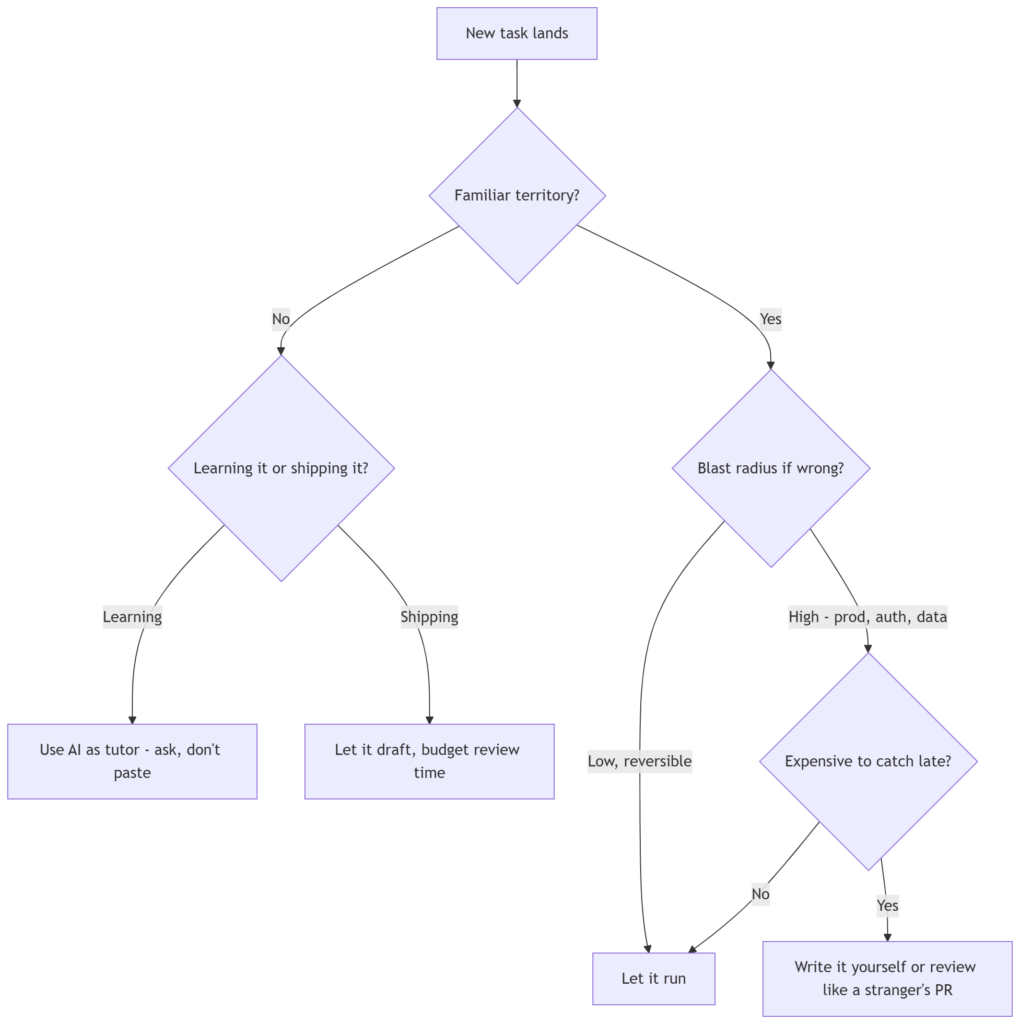
The shape underneath that table is closer to a flowchart than a fixed rule, so here’s the actual decision I run through before reaching for a coding agent:

Two questions do most of the work here: do you already have a mental model of what you’re touching, and what happens if the output is wrong and nobody catches it for a week. Everything else, like which model or which vendor, is implementation detail that will have changed again by the time you read this.

Treat it like any other total-cost-of-ownership call

Every cost in this post is a total-cost-of-ownership problem, and IT professionals already know how to run those. Nobody greenlights a new platform because the sticker price looked reasonable without asking what it costs to operate and support over the next three years. AI tooling deserves that same discipline, just split across two ledgers instead of one: what it costs in tokens, and what it costs in the understanding your team would have built anyway by doing the work themselves.

That pull request Cursor wrote in ninety seconds probably did save you time. Just budget for the chance that it didn’t, that it needs a harder look than you’re inclined to give it, and that the muscle you skipped today is the one you’ll need on the day the model is wrong and you’re the only person who’d have known.

What I’d actually do on Monday

Instrument both meters, because right now most organisations are flying blind on one and in denial about the other.

On spend: get per-team token attribution before you get a budget surprise, set caps at the gateway rather than in a policy document nobody reads, and stop assuming that a more capable model is a more expensive model’s replacement rather than its addition.

On cognition: pick one thing per quarter that you learn the slow way. Not everything — that’s martyrdom, not strategy. One thing you’ll need to own, that you deliberately struggle through without the assistant. Getting painfully stuck is not wasted time; it is how the debugging skill gets built, and the debugging skill is what makes you worth having in the loop at all.

The engineers who’ll be valuable in three years aren’t the ones who avoided these tools. They’re the ones who stayed able to tell when the tools were wrong.

AI Agents, Explained: A Guide for Beginners

If you’ve spent any time around technology in the last couple of years, you’ve heard the word “agent” thrown around a lot — usually with more excitement than precision. This post is an attempt to fix that. I’ll explain what an AI agent actually is, when you should (and shouldn’t) reach for one, how they work under the hood, the vocabulary you’ll keep bumping into, and the two things that decide whether an agent project succeeds in production: cost and safety.

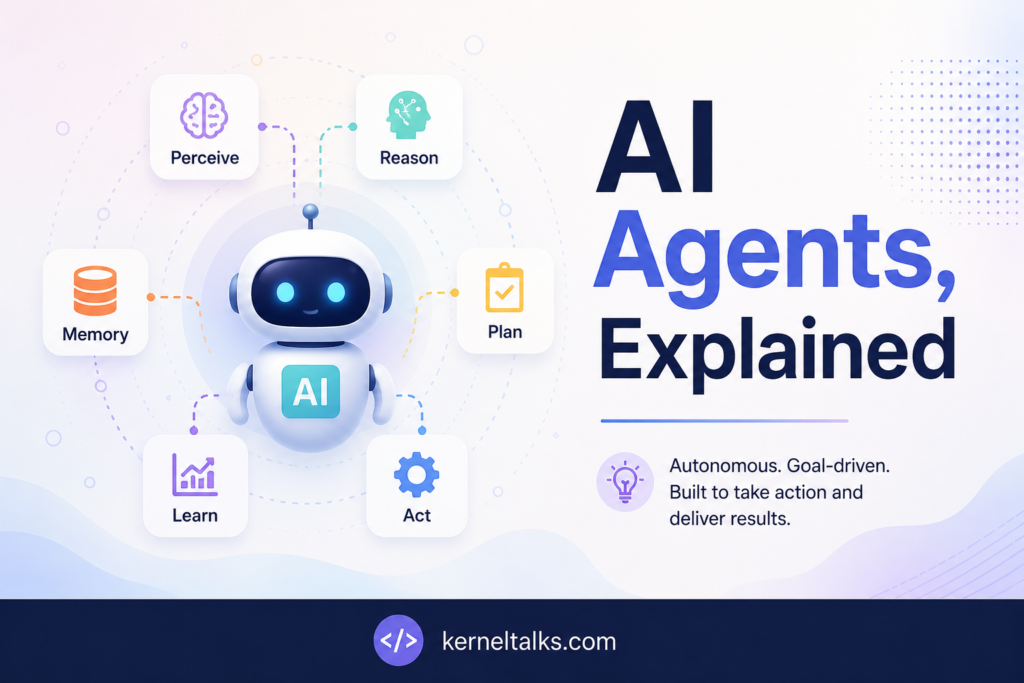
AI agents!

I’ve written it to be readable if you’re brand new to AI, while still being concrete enough for an IT professional who has to make systems, design or architecture decisions.

First, what is an “agent”?

The idea is older than the current AI wave. In classic computer science, an intelligent agent is defined as “an entity that perceives its environment, takes actions autonomously to achieve goals, and may improve its performance through machine learning or by acquiring knowledge” (Wikipedia). That textbook framing — perceive, decide, act — still holds today.

The modern, cloud-vendor version says much the same thing in plainer words. AWS defines an AI agent as “a software program that can interact with its environment, collect data, and use that data to perform self-directed tasks that meet predetermined goals” (AWS). The key word is self-directed: you give it a goal, not a step-by-step script.

What’s new is the brain. In today’s agents, the control flow is “frequently driven by large language models” (Wikipedia). The LLM is what lets the agent understand a fuzzy instruction in plain English, decide what to do next, and adapt when things don’t go as planned.

The one distinction that clears up most confusion: workflows vs. agents

Here’s the single most useful mental model I’ve found, from Anthropic’s engineering team. They separate “agentic systems” into two categories:

  • Workflows are “systems where LLMs and tools are orchestrated through predefined code paths.”
  • Agents are “systems where LLMs dynamically direct their own processes and tool usage, maintaining control over how they accomplish tasks” (Anthropic).

In a workflow, you wrote the flowchart and the LLM fills in the boxes. In an agent, the model decides the flowchart at runtime. That difference drives everything else — predictability, cost, and risk all shift when you hand the steering wheel to the model.

How an agent actually works

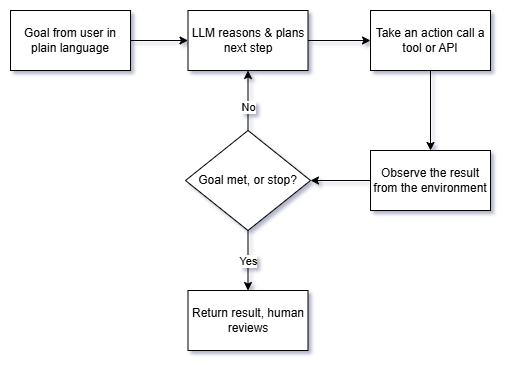
Strip away the hype and most LLM agents are, in Anthropic’s words, “just LLMs using tools based on environmental feedback in a loop” (Anthropic). That loop is the whole thing:

Walking through it the way AWS frames the process — determine the goal, acquire information, implement tasks, then evaluate outcomes and adjust (AWS):

  1. Goal in. A person gives the agent a task in natural language. A good agent will pause to clarify an ambiguous request before charging ahead.
  2. Reason and plan. The LLM decides what the next step should be.
  3. Act via a tool. The agent does something in the real world — queries a database, calls an API, runs code, sends an email.
  4. Observe. Critically, the agent must “gain ‘ground truth’ from the environment at each step (such as tool call results or code execution) to assess its progress” (Anthropic). This feedback is what separates an agent from a chatbot that just guesses.
  5. Loop or stop. It repeats until the goal is met or a stopping condition trips.

The building block: an “augmented LLM”

The atom of every agent is what Anthropic calls the augmented LLM — a language model enhanced with three capabilities: retrieval, tools, and memory (Anthropic). Modern models can actively generate their own search queries, pick the right tool, and decide what information is worth keeping. AWS describes a similar architecture: a foundation model, a planning module, a memory module, tool integration, and a learning/reflection mechanism (AWS).

The vocabulary you’ll keep hearing

Tools. A tool is anything the agent can call to affect or observe the world — a search API, a calculator, a code interpreter, a database query. The quality of your tool descriptions matters more than people expect. Anthropic recommends “poka-yoke” design (a manufacturing term for mistake-proofing) — writing tool parameters and descriptions so clearly, with examples and edge cases, that it’s hard for the model to misuse them (Anthropic).

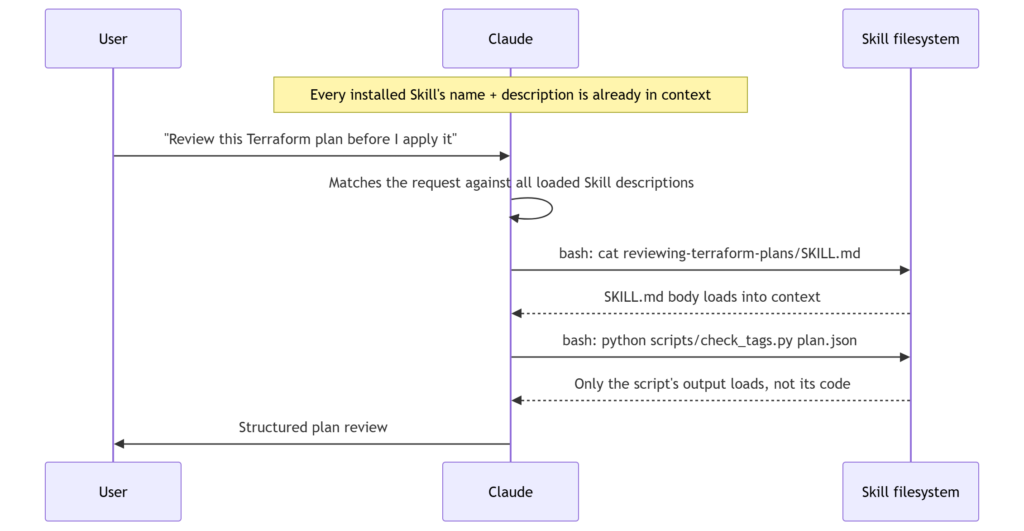
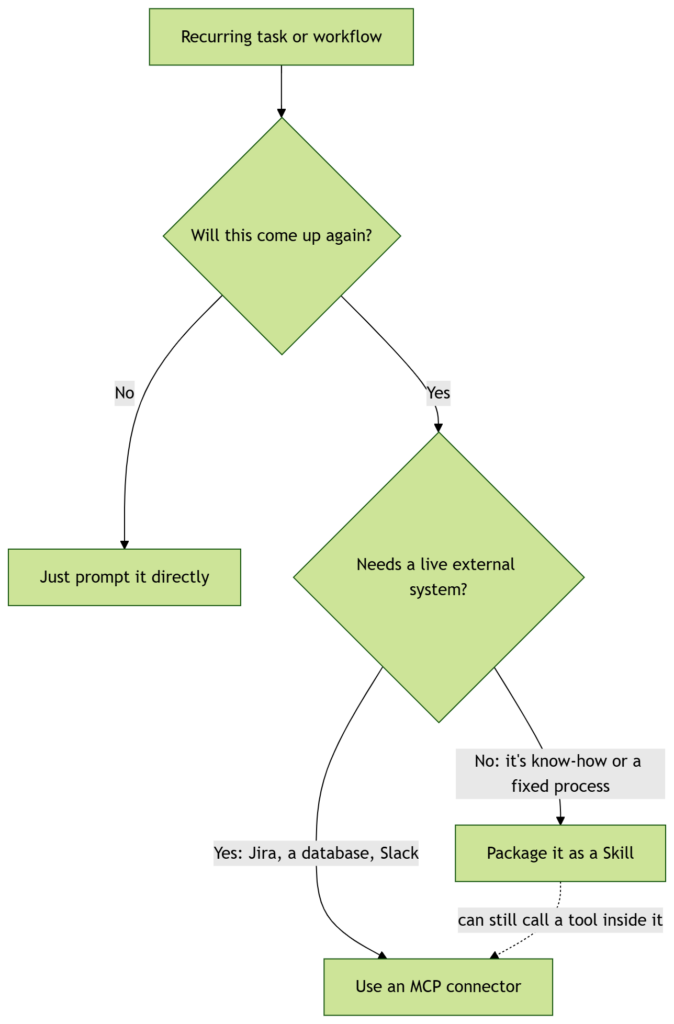
Skills. A newer concept worth knowing: Skills are “folders that include instructions, scripts, and resources that Claude can load when needed” (Anthropic). They work through progressive disclosure — the agent scans available skills, and “when one matches, it loads only the minimal information and files needed,” which keeps it fast while still having specialized expertise on tap. Skills are composable (they stack), portable (“build once, use across Claude apps, Claude Code, and API”), and efficient because they only load what’s needed, when it’s needed (Anthropic). Think of a skill as a reusable competency you can hand to an agent, rather than cramming everything into one giant prompt.

MCP (Model Context Protocol). As soon as you want an agent to talk to real systems, you hit an integration problem: every tool has its own API. MCP is “an open-source standard for connecting AI applications to external systems.” The docs use a nice analogy — “think of MCP like a USB-C port for AI applications,” a standardized way to plug an agent into data sources, tools, and workflows (MCP). For IT teams, the appeal is “build once and integrate everywhere” instead of writing a bespoke connector per tool.

Memory. Agents distinguish between short-term memory (the current task’s context) and longer-term memory (things worth keeping across sessions). It’s one of the augmented-LLM enhancements above, and one of AWS’s core architecture components (AWS).

Multi-agent systems. Instead of one agent doing everything, you can have several specialized agents collaborate. Both the classical taxonomy and AWS list multi-agent systems as a category (Wikipedia; AWS). Anthropic’s orchestrator-workers pattern is a concrete version: a central LLM breaks a task into subtasks, delegates them, and synthesizes the results (Anthropic).

A quick note on “types of agents”

If you read the academic material, you’ll see five classical classes: simple reflex, model-based reflex, goal-based, utility-based, and learning agents (Wikipedia). AWS extends the list with hierarchical and multi-agent systems (AWS). You don’t need to memorize these, but they’re a useful reminder that “agent” is a spectrum of autonomy, not a single thing.

When to use an agent — and when not to

This is the section I wish more people read first. The honest guidance from Anthropic is to resist building an agent until you actually need one: “find the simplest solution possible, and only increasing complexity when needed.” Agentic systems “typically increase latency and costs while improving task performance,” so it’s a genuine trade-off, not a free upgrade. In fact, for many applications, “optimizing single LLM calls with retrieval and in-context examples is usually enough” (Anthropic).

A practical way to decide:

  • Use a workflow when the task is well-defined and you value predictability. If you can draw the flowchart yourself, hard-code it.
  • Use an agent when flexibility and model-driven decision-making are essential — the path can’t be known in advance, and the number of possible steps is large (Anthropic).

Common patterns that sit between a single prompt and a full agent are worth knowing, because they often solve the problem more cheaply: prompt chaining (sequential steps with checkpoints), routing (classify an input and send it to a specialist), parallelization (split work up, or run it several times and vote), orchestrator-workers, and evaluator-optimizer (one model generates, another critiques, in a loop) (Anthropic). My advice: try to solve your problem with one of these before you reach for full autonomy.

Keeping costs under control

Because agents run the LLM in a loop and call tools repeatedly, cost and latency are design concerns from day one, not afterthoughts. The trade-off is baked in — more autonomy means more model calls (Anthropic). Grounded in the sources above, here’s how to keep the bill sane:

  • Don’t build an agent you don’t need. The cheapest agent is the one you avoided by using a single well-designed LLM call, a retrieval step, or a fixed workflow instead (Anthropic).
  • Set stopping conditions. Anthropic explicitly recommends limits like a maximum number of iterations so an agent can’t loop forever and quietly run up cost (Anthropic). This is the single most important cost guardrail.
  • Load only what’s needed. This is exactly why progressive disclosure in Skills matters — it “only loads what’s needed, when it’s needed” instead of stuffing every instruction into context on every call (Anthropic). Less context per call means lower token cost.
  • Match the pattern to the task. A routing step that sends easy requests down a cheaper path, and only hard ones to the expensive full-agent path, can cut cost dramatically (Anthropic).

A caveat, so I don’t overstate things: specific pricing, token rates, and model-tier costs change constantly and depend on your provider. Check the current pricing page for whatever model you use — I’m deliberately not quoting numbers the sources didn’t give me.

Security, guardrails, and human oversight

Handing an autonomous system access to your tools and data is a real risk surface, and the sources are consistent about how to manage it: test in isolation, constrain what the agent can do, and keep a human in the loop.

  • Test in a sandbox. Anthropic calls “extensive testing in sandboxed environments” essential before you let an agent loose (Anthropic). Give it a safe playground before it touches production.
  • Design tools to prevent mistakes. The poka-yoke principle again — make dangerous or ambiguous tool use structurally hard, not just discouraged (Anthropic).
  • Use platform guardrails. Managed services provide built-in safety layers; AWS points to “Amazon Bedrock Guardrails” as an example of built-in security for agents (AWS).
  • Keep humans in the loop. Agents should be able to pause for human feedback “at checkpoints or when blocked” (Anthropic), and human review remains a core safeguard against biased or inaccurate output (AWS). For anything irreversible — sending money, deleting data, emailing customers — a human approval step is not optional.

If you take one security principle away: an agent should never have a capability you wouldn’t hand to a brand-new employee on their first day without supervision.

Bringing it together

Here’s the whole picture in one view:

  • An AI agent takes a goal in plain language and pursues it self-directedly.
  • Under the hood it’s an augmented LLM (model + tools + memory + retrieval) running a perceive → reason → act → observe loop.
  • Skills package reusable expertise; MCP standardizes how the agent connects to the outside world; multi-agent setups split work across specialists.
  • Reach for an agent only when a simpler workflow won’t do — autonomy costs latency and money.
  • Stopping conditions, sandboxing, and human oversight are what make the whole thing safe to run.

The technology is genuinely useful, but the teams who succeed with it are the ones who stay skeptical: they start simple, add autonomy only where it earns its keep, and never let an agent act unsupervised on anything that’s hard to undo.


References

  1. Anthropic — Building Effective Agents
  2. AWS — What are AI agents?
  3. Anthropic — Agent Skills
  4. Model Context Protocol — Introduction
  5. Wikipedia — Intelligent agent

Understanding the CLAUDE.md File: A Beginner’s Guide to Getting More Out of Claude

If you’ve started using Claude Code, you’ve probably hit the same small annoyance more than once: you explain your project, Claude helps, and then in the next session you’re explaining the very same things all over again. Which framework you use. Where the tests live. How you like your commits phrased. It’s like onboarding a new teammate every single morning.

Understanding claude.md

The CLAUDE.md file fixes exactly that. It’s one of the simplest features to set up and one of the highest-leverage, especially once you understand what it’s really doing behind the scenes. This guide walks a first-time user through what it is, how it works, and how to use it well.

What is a CLAUDE.md file?

A CLAUDE.md is a configuration file that gives Claude project-specific context. The key detail — and the reason it matters so much — is that Claude automatically incorporates it into every conversation. You don’t have to attach it, paste it, or remind Claude it exists.

Mechanically, the file becomes part of Claude’s system prompt. In plain terms: every conversation starts with that context already loaded. So instead of re-describing your project each time, you write it down once and Claude simply knows it going forward.

Think of it as a persistent briefing note for your project. Whatever you’d find yourself repeating to a new collaborator is a good candidate for the file.

Where the file lives

You can place a CLAUDE.md in a few different spots depending on how widely you want it to apply:

  • Your repository root — the most common choice. Put it here so it applies to the project and can be shared with your team.
  • A parent directory — useful for monorepo setups where you want shared context sitting above several projects.
  • Your home folder — this applies universally, across all your projects, for instructions you always want in play.

You’re not limited to one. A home-folder file for your personal preferences plus a repo-root file for the project is a natural combination.

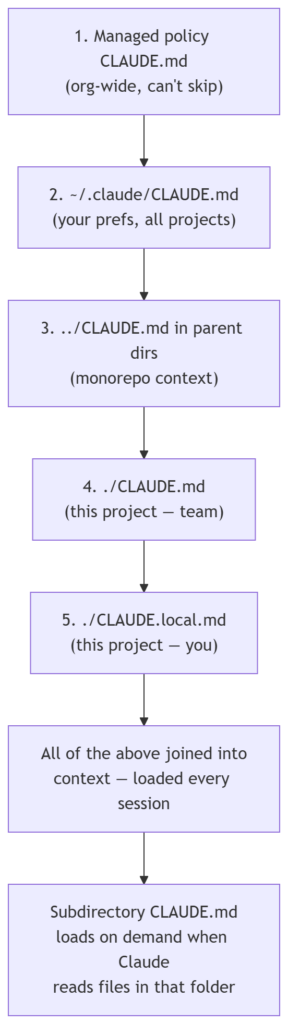
There isn’t just one CLAUDE.md — there’s a small hierarchy, each level with a different scope. Here they are, from broadest to most specific:

ScopeLocationWho it’s for
Managed policy (org-wide)macOS: /Library/Application Support/ClaudeCode/CLAUDE.md
Linux/WSL: /etc/claude-code/CLAUDE.md
Windows: C:\Program Files\ClaudeCode\CLAUDE.md
Everyone in your organization
User instructions~/.claude/CLAUDE.mdJust you, across all your projects
Project instructions./CLAUDE.md or ./.claude/CLAUDE.mdYour whole team (via source control)
Local instructions./CLAUDE.local.md (add to .gitignore)Just you, in this one project

As a beginner, you’ll care most about the project file (./CLAUDE.md at your repo root) and maybe your personal user file (~/.claude/CLAUDE.md). The managed-policy level is something an IT/DevOps team sets up centrally.

How the levels combine

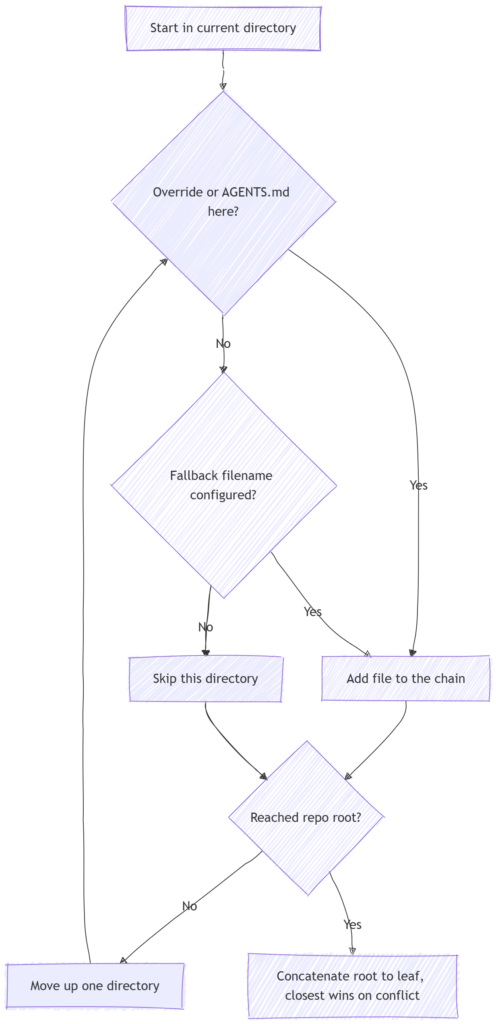
Here’s the part that trips people up: these files don’t override each other — they’re all concatenated together into context. Claude also walks up the directory tree from wherever you launched it, picking up a CLAUDE.md in each parent folder along the way. Content is ordered from the filesystem root down to your working directory, so the instructions closest to where you’re working are read last.

One practical tip from the docs: to confirm which files actually loaded in a session, run /context and look under Memory files.

Getting started with /init

The easiest way to create your first one is to run the /init command inside Claude Code. It analyzes your codebase and generates a starter CLAUDE.md for you.

One honest caveat, straight from the source: /init “captures obvious patterns but may miss nuances specific to your workflow.” So treat what it produces as a first draft, not a finished document. Read it over, correct anything that’s off, and add the details it couldn’t have inferred. The generated file is a starting line, not a finish line.

How to structure your CLAUDE.md

You don’t need every section, but these are the kinds of things worth documenting:

  • A project summary and architecture overview — what the project is and how it’s put together.
  • Directory structure — the key folders and what lives where.
  • Coding standards and conventions — how you want code written.
  • Common commands, with examples — the build, run, and lint commands you use often.
  • Testing requirements and workflows — how tests are run and what’s expected.
  • Tool integration documentation — the tools your project relies on.
  • Development environment setup — what someone needs to get running.

The reference material includes a worked example built around a FastAPI project, showing the project structure, standards, and common commands all in one file, along with an example of a custom performance-optimization command. If you work in a different stack, the same shape applies — just fill it with your own project’s details.

Best practices worth adopting early

A few principles will keep your file useful rather than bloated:

  • Keep it concise and human-readable. This isn’t a formality. Because the file loads into context every single time, its length has a real cost. Conciseness is part of using Claude well, not just tidiness.
  • Start simple and expand based on friction. Don’t try to document everything up front. Add to the file when you notice yourself repeating an instruction or running into a recurring rough edge.
  • Split it up if it gets big. If the file grows unwieldy, one option is to break the information into separate markdown files and reference them from inside CLAUDE.md.
  • Document what your team actually does — the real workflows you follow, not the idealized version you wish you followed.
  • Never put secrets in it. Keep API keys, credentials, and database connection strings out. This matters especially because you’ll often commit the file to version control.

When should you add something to it?

The docs give a nice, concrete rule of thumb. Add to your CLAUDE.md when:

  • Claude makes the same mistake a second time.
  • A code review catches something Claude should have known about this codebase.
  • You type the same correction into chat that you typed last session.
  • A new teammate would need that same context to be productive.

Keep it to facts Claude should hold in every session: build commands, conventions, project layout, and “always do X” rules.

Two handy shortcuts: # and /clear

As you work, you can use the # key to quickly add an instruction you find yourself repeating. Over time, these additions accumulate into your CLAUDE.md — a low-effort way to grow the file organically instead of sitting down to write it all at once.

The /clear command is its companion. It resets the context window between distinct tasks while preserving your CLAUDE.md. So you can wipe the slate clean between unrelated jobs without losing the project context you’ve carefully set up.

Sharing with your team

Because a CLAUDE.md at the repo root travels with the project, you can commit it to version control so your team benefits from the same shared context. Everyone’s Claude starts from the same briefing. Just remember the earlier warning — since it’s now in your git history, keep sensitive information out of it.

There’s also room to grow beyond the file itself: you can create custom slash commands as markdown files in a .claude/commands/ directory, which is a natural next step once your CLAUDE.md is settled.

Start simple, expand deliberately

If you take one thing away, let it be this: begin small. Run /init, review what it produces, and let the file grow as your real workflow reveals what’s worth writing down. A short, accurate CLAUDE.md beats a sprawling one that nobody maintains — and it costs you less context on every conversation, too.

For a first-time Claude user, this single file is probably the fastest way to make Claude feel like it genuinely understands your project rather than projects in general. Set it up once, tend it occasionally, and you stop paying the “explain it all again” tax for good.