
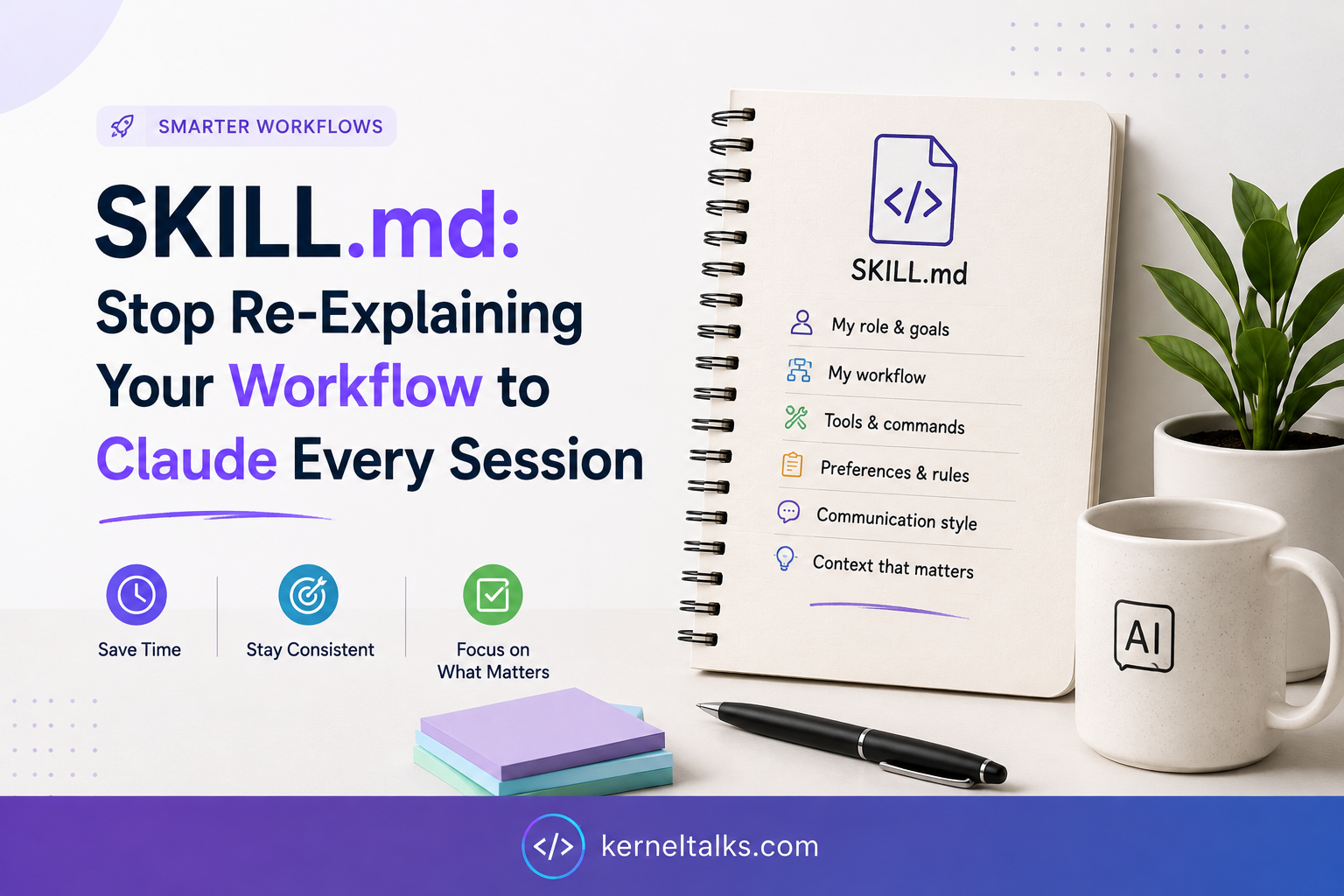
Somewhere in your notes app, or maybe just muscle memory, there’s a paragraph you retype into Claude at the start of almost every work session. The AWS tags that are actually mandatory versus the ones nobody enforces. The five things a pull request review always has to check before it counts as “done.” Which environments tolerate an open security group and which ones get you a message from the security team five minutes later. You paste it in, the model gets up to speed, and you move on to the actual task. Next week you paste it in again, because the model has no memory of last Tuesday, and the teammate who just joined your channel has never seen that paragraph at all.

That’s the exact problem Anthropic built Agent Skills to solve, and the fix is almost embarrassingly low-tech: a folder with a markdown file in it, named SKILL.md.
What a SKILL.md file actually is
A Skill is a directory. At minimum it holds one file, SKILL.md, which opens with a short YAML header (called frontmatter) and is followed by ordinary markdown instructions. That’s the entire format. No special runtime, no proprietary config language, nothing to compile.
If you’ve ever asked Claude to build you a PowerPoint deck or clean up an Excel sheet, you’ve already used one without realizing it. The document tools Claude ships with for PowerPoint, Excel, Word, and PDF are, under the hood, ordinary Skills, the same folder-and-markdown format you’d use to build your own.
Anthropic frames building a Skill as putting together an onboarding packet for a new hire: here’s what you need to know, here’s how we do things, here’s where to look if you get stuck further in. The engineering post announcing the feature, published on October 16, 2025, walks through this using a PDF-handling Skill as its running example, and the team signs off the post with a joke about their shared fondness for folders. Fair enough — a Skill really is just a folder that happens to be very good at its one job.
Beyond instructions, a Skill can bundle reference docs, templates, and actual executable scripts, all living in the same directory. Claude reads whatever it needs and leaves the rest sitting on disk untouched. That last part turns out to be the whole point of the design.
The problem this actually solves
Before Skills, there were two bad options for capturing “how we do things here.” Cram everything into one enormous system prompt, and Claude carries your entire team’s handbook in its head on every single request, most of it irrelevant to whatever you actually asked. Or build a separate, narrowly scoped agent for every recurring task, which stops scaling somewhere around the third or fourth workflow.
Skills get around both by loading information in stages, a pattern Anthropic calls progressive disclosure. None of a Skill’s full content sits in context until Claude decides it’s actually relevant to the request in front of it.
How the loading actually works
There are three levels, and the token cost changes sharply between them, according to Anthropic’s documentation:
| Level | When it loads | Rough cost | What’s in it |
|---|---|---|---|
| 1. Metadata | Always, at startup | ~100 tokens per Skill | Just the name and description |
| 2. Instructions | Only when the Skill is triggered | Aim under ~5k tokens (body under 500 lines) | The markdown body: workflow, rules, templates |
| 3. Resources and scripts | Only as needed | Nothing, until read or run | Reference files, templates, executable scripts |
Install thirty Skills and Claude carries thirty short descriptions around at all times, which is cheap. It reads the full body of exactly one of them: whichever matches your request. Anything that Skill bundles beyond its own SKILL.md, a reference doc or a Python script, stays untouched on the filesystem unless Claude specifically goes looking.
Here’s what that looks like end to end, using a Skill built to review Terraform plans before they’re applied:

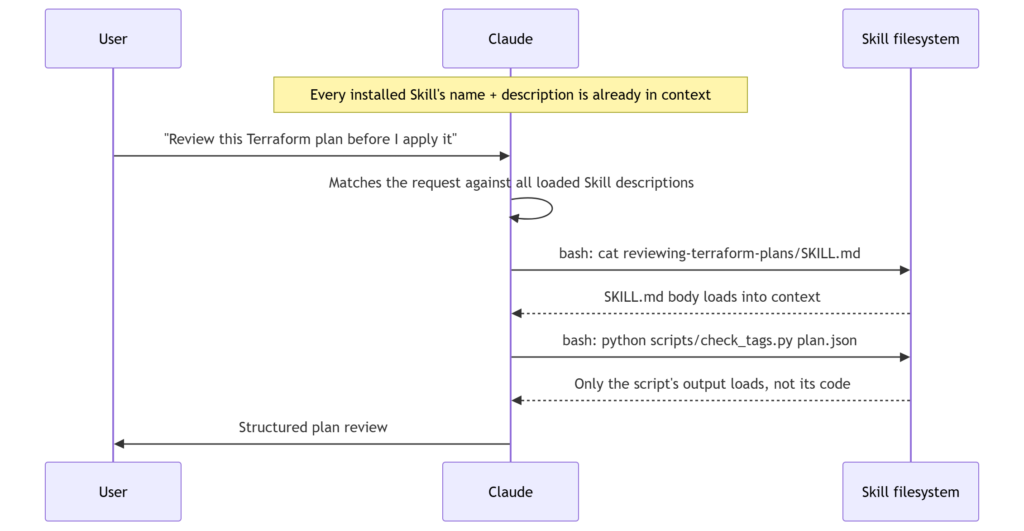
Notice the script step. Claude runs check_tags.py through bash and only the output, a pass or a list of violations, comes back into context. The script’s actual code never loads. It’s also why Anthropic’s guidance leans toward writing real utility scripts for anything deterministic, tag validation, checking for overlapping form fields, whatever the equivalent is in your domain, rather than asking Claude to regenerate that logic from scratch every single time. A script is more reliable, and it’s nearly free, token-wise.
When, and why, to reach for one
Skills earn their keep on anything you’d otherwise explain more than once. A few honest signals it’s worth the twenty minutes:
- You’ve caught yourself pasting the same context, checklist, or gotcha into more than two or three conversations already
- The task follows a procedure your team already agreed on, a review process, a report format, a migration sequence, and you want everyone’s output to actually look the same
- You want to stack several of these specialized capabilities in one session; Skills compose, so a single request can trigger more than one at a time
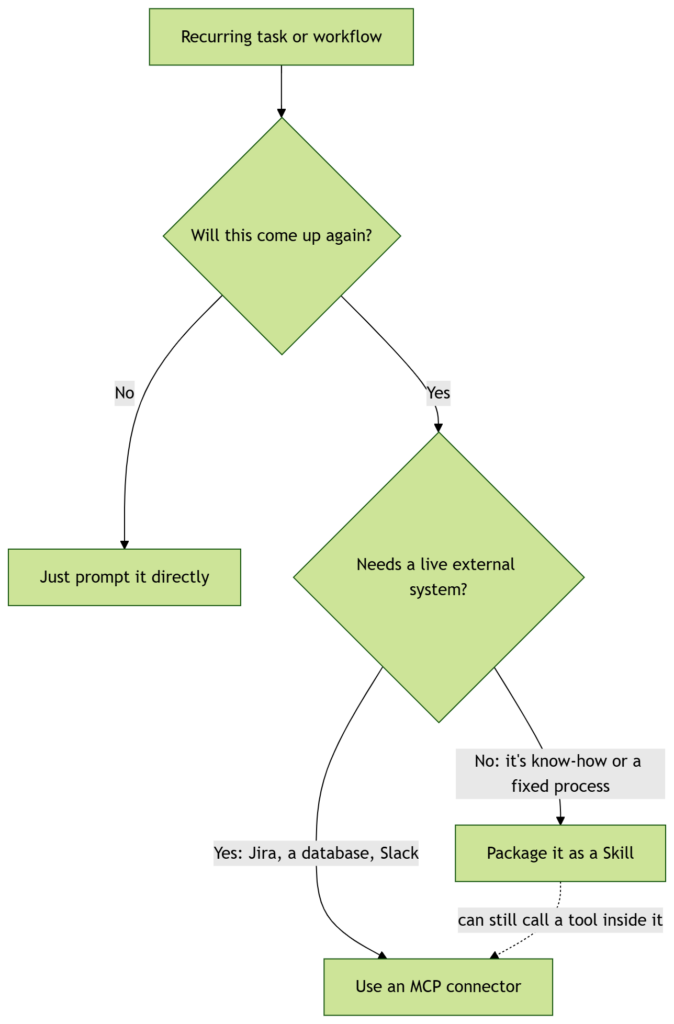
Where beginners usually get tangled is the line between a Skill and MCP (Model Context Protocol). A Skill is packaged know-how: instructions, and optionally code, sitting on Claude’s filesystem. It is not a live connection to Jira, a production database, or your calendar. That’s exactly what MCP connectors exist for. The two aren’t rivals. A Skill’s instructions can absolutely tell Claude to call a specific MCP tool partway through a workflow, and Anthropic’s own guidance is to reference it by its fully qualified name, something like GitHub:create_issue, so Claude doesn’t confuse it with a similarly named tool from a different server. The Skill supplies the how and the when. MCP supplies the reach into a live external system.

Anatomy of a real one
Here’s a small but complete Skill: the same Terraform-review example from the diagram above.
reviewing-terraform-plans/
├── SKILL.md
├── RULES.md
└── scripts/
    └── check_tags.py
---
name: reviewing-terraform-plans
description: Reviews Terraform plan output against infrastructure safety rules before apply. Flags unapproved destroys, missing required tags, and security groups or storage buckets opened to the public internet. Use whenever the user pastes terraform plan output, uploads a plan file, or asks whether a Terraform change is safe to apply.
---

# Reviewing Terraform Plans

## Quick workflow

1. Read the pasted plan output, or run `terraform show -json tfplan.binary` if a binary plan file was provided.
2. Flag every resource marked for **destroy** or **replace**. Check [RULES.md](RULES.md) for whether that resource type needs a second approver before it's safe to apply.
3. Verify tagging by running `python scripts/check_tags.py plan.json` instead of reading the JSON by eye. It lists every resource missing an `owner` or `environment` tag.
4. Flag any security group, storage bucket policy, or load balancer rule that widens access to `0.0.0.0/0`.
5. Write up the findings using the format below.

## Report format

Always structure the review like this:

```
## Plan Review: [environment]
### Blocking
### Needs a second look
### Looks safe
```

Only use "Looks safe" for resources that passed both the destroy check and the tag check.

## Rules for destroys and replaces

See [RULES.md](RULES.md) for the sign-off matrix: which resource types need a second approver, which are safe to auto-approve, and how to write a rollback note.

## Utility scripts

**scripts/check_tags.py** — validates required tags against a JSON plan export. Exits non-zero and lists offending resources if anything is missing `owner` or `environment`.
Now the walk-through. The frontmatter is the only mandatory part, and both of its fields do real work rather than just labeling the file.
name has firm rules:
- Maximum 64 characters
- Lowercase letters, numbers, and hyphens only
- No XML tags
- Can’t contain “anthropic” or “claude”
Anthropic’s naming guidance recommends a gerund form, like reviewing-terraform-plans or processing-pdfs, on the theory that it reads as an activity rather than a vague noun like helper or utils. That’s a recommendation, not a hard rule, but it’s a good one.
description matters more than it looks like it should, because it’s the only thing Claude sees before deciding whether to open the file at all:
- Non-empty, maximum 1,024 characters
- No XML tags
- Written in third person, not “I can help you review…”
- Must cover both what the Skill does and when to reach for it
Get this vague, “helps with infrastructure,” say, and the Skill just won’t fire reliably, because Claude is pattern-matching your actual request against this exact text before it ever reads the body.
Everything below the frontmatter is “Level 2,” read only once the description matches. The workflow section is a numbered procedure rather than loose prose, because this is what Anthropic calls a narrow-bridge task: there’s basically one correct order of operations, so it gets specific, low-freedom steps instead of general guidance. A code-review Skill, by contrast, is an open-field task. Several valid approaches exist depending on context, so the right move there is a looser set of principles Claude can apply with judgment.
The report format is a plain template. Claude copies the structure rather than inventing its own headers each time, which is what keeps five plan reviews from five different engineers from looking like five different documents.
RULES.md is the interesting one. It’s referenced by name but not pulled into SKILL.md itself, so it costs zero tokens unless a destroy actually shows up in the plan. That’s progressive disclosure paying off directly: most Terraform plans don’t touch anything destructive, so most reviews never load it at all.
And check_tags.py exists because validating tag presence is exactly the kind of deterministic, no-judgment-required task a script handles more reliably, and far more cheaply, than having Claude parse JSON by eye on every single run.
Where it’s not worth the effort
A few situations where reaching for a Skill is the wrong move.
One-off tasks. If you’re never going to ask for this again, just ask directly. Claude tends to only bother consulting a Skill for something it can’t already handle cleanly with its built-in tools, so a simple “summarize this PDF” often won’t trigger a Skill at all, matching description or not, because there was no real gap for the Skill to fill.
A single fact or preference. “I prefer metric units” isn’t a workflow. It’s a preference, and it belongs in your settings or a saved memory, not a folder with a YAML header.
Anything that needs a live connection to an external system. As covered above, that’s MCP’s job.
Content with a shelf life. Baking in “as of this month, use the v1 API” is a trap. Anthropic’s own best-practices guidance calls this out directly: keep only the current method in the main instructions, and tuck anything deprecated into a collapsed “old patterns” section instead of sprinkling date-conditional logic through the file. A Skill that says “if it’s before August, do X” is simply wrong the moment August ends.
It’s a standard now, not just a Claude feature
Skills launched on October 16, 2025 as an Anthropic-specific mechanism across Claude.ai, Claude Code, the Claude Developer Platform, and the Agent SDK. On December 18, 2025, Anthropic published the format as an open, cross-platform standard, meaning a well-written SKILL.md folder isn’t locked to one vendor. At the time of writing, the same format is supported, with varying degrees of completeness, by dozens of other agent tools, including Cursor, GitHub Copilot, VS Code, Gemini CLI, and OpenAI Codex.
Practically, that’s a reason to actually invest in writing these well. A Skill your team builds for Claude Code today is a reasonable bet to keep working if part of your toolchain moves somewhere else next year.
Guidelines worth following even though nothing enforces them
Beyond the hard constraints on name and description, Anthropic’s best-practices guide is mostly soft guidance. It’s worth taking seriously anyway.
Keep it concise. The default assumption should be that Claude already knows what a PDF is or how a REST API works, so don’t spend tokens re-explaining things it already knows. Match your level of specificity to how fragile the task actually is: loose, principle-based instructions for judgment calls, and exact scripts with no room for improvisation anywhere one wrong step corrupts data. Anthropic’s own comparison is a narrow bridge versus an open field, and it’s a genuinely useful way to decide how much rope to give.
Keep reference files exactly one level deep from SKILL.md. If Claude has to follow a chain of three linked files to find the actual instruction, it tends to skim with something like head -100 rather than read the whole thing, and you lose information you thought you’d included. And build a few test cases before writing extensive documentation, not after, so you’re solving problems Claude actually has rather than ones you imagined it might have.
Guardrails: treat a Skill like software, because it is one
This part is easy to skip past, and shouldn’t be. A Skill can execute code and invoke tools, which means a careless or malicious one can do real damage: read files it shouldn’t, reach out to an external URL with data picked up along the way, or quietly do something other than what its own description claims.
Anthropic’s security guidance is blunt about it: only install Skills from sources you trust, yourself or Anthropic directly, and if you’re using one from anywhere else, audit every file in the directory first, not just SKILL.md. Pay particular attention to anything that reaches out to an external URL, since fetched content can carry instructions of its own that Claude never asked for.
If you’re rolling Skills out across a team, Anthropic’s enterprise guidance is direct about treating this like any other software approval process rather than something looser: run a risk assessment before deployment, require an evaluation suite of representative queries covering cases where the Skill should trigger, shouldn’t, and sits ambiguously in between, and don’t let a Skill anywhere near production until it clears that bar. The general shape most teams land on beyond that: someone other than the author reviews the actual instructions and code, it gets tried out in an isolated environment first, and there’s a simple record somewhere of what’s approved and who owns it. “It’s just a markdown file” is exactly the assumption that causes problems once that markdown file starts running Python.
It’s also worth knowing the sandbox itself isn’t identical everywhere. Skills running through the Claude API get no network access and can’t install packages at runtime; whatever’s pre-installed is what you get. Skills in Claude Code have the same network access as anything else running on your machine. That difference alone should shape what you’re willing to let a given Skill actually do.
Actually building one
The fastest way in is almost too simple to feel like real advice: ask Claude to write it. Claude already understands the SKILL.md format natively, so work through a task normally, then say something like “turn this into a Skill,” and it’ll produce a properly structured file with sensible frontmatter on the first pass. From there, the loop that actually improves a Skill is boring but effective: use it on a real task, notice where Claude reached for the wrong file or skipped a rule, and go fix that specific gap instead of rewriting the whole thing speculatively.
For a more structured on-ramp, Anthropic’s quickstart and cookbook cover the API side end to end, and DeepLearning.AI has a short course built with Anthropic if you’d rather work through examples with someone walking alongside you.
Either way, the actual test for whether a Skill is worth keeping is the same test you’d apply to any piece of internal documentation: does the next person who hits this task get through it faster because the file exists? If yes, it’s earning its space on disk. If not, it’s just another file nobody reads, which, folder or not, is the exact problem you were trying to get away from in the first place.