Point Claude Code or Codex at a repository they’ve never seen, and neither one starts by writing code. First comes the reconnaissance: reading package.json, grepping for a test runner, guessing whether this is a monorepo, checking three wrong places for the linter config before finding it in a fourth. On a decent-sized codebase that’s a real number of tool calls spent before anything useful happens, and it happens again next session, because the agent’s context resets to nothing every time you start over.


AGENTS.md exists to short-circuit exactly that. It’s a plain markdown file, checked into version control, that hands a coding agent the answers up front instead of making it rediscover them from scratch. Not a complicated idea. It also just turned one — OpenAI released it in August 2025 — and in twelve months it’s landed in something like 60,000 open-source repositories and been adopted, in one form or another, by nearly every coding agent you can name (more on the one notable holdout shortly). Adoption isn’t really the interesting question anymore, though. Whether the file does what everyone assumed it would is a lot less settled, and two studies published a few months apart this year came back with answers that don’t fully agree with each other.
A README that isn’t for you
The framing agents.md uses for itself is the right one: README.md is for humans, AGENTS.md is for the thing reading your code without a human’s patience for ambiguity. Your README covers what the project is and how to get started. AGENTS.md covers what would clutter a human-facing doc but that an agent genuinely needs on every task — exact build and test commands, code style rules, which directories are off-limits, how pull requests get reviewed, where the security landmines are buried. There’s no required schema. It’s markdown, and whatever headings you choose get parsed as plain text, the same way a person would read them.
Large repos nest it. Drop another AGENTS.md inside a package or service, and agents are expected to read the nearest one in the directory tree first, layering it on top of whatever sits above it. OpenAI’s own monorepo reportedly has 88 of these scattered through it, which says something about how granular teams end up going once they commit to the pattern.
The format itself grew out of Codex, but it didn’t stay OpenAI’s alone for long — Amp, Jules from Google, Cursor, and Factory all shaped the shared convention early on. Then in December 2025, OpenAI donated it to the newly formed Agentic AI Foundation under the Linux Foundation, in the same announcement where Anthropic contributed the Model Context Protocol and Block contributed goose. That’s a sound move for a file format whose entire value depends on every vendor honoring it the same way. MCP made an identical bet a few months earlier, and it’s hard to argue the alternative — one company unilaterally deciding what the format means, forever — would have aged well.
Closest file wins. Except everyone implements that differently.
The spec’s own FAQ is short on what happens when instructions conflict: whichever AGENTS.md sits nearest to the file you’re touching takes precedence, and anything you type directly into chat overrides all of it. That’s guidance, not a technical guarantee, though. AGENTS.md isn’t a protocol with a reference parser — it’s a convention, and every tool built its own discovery logic around it.
Codex’s own documentation is the most precisely specified version of this, so it’s worth walking through once. Codex rebuilds its instruction chain fresh every time it starts: first a global file in your Codex home directory (the override version if one exists, otherwise the regular ~/.codex/AGENTS.md), then a walk from the project root down to wherever you’re actually working, picking up at most one file per directory along the way. Roughly, that walk looks like this:

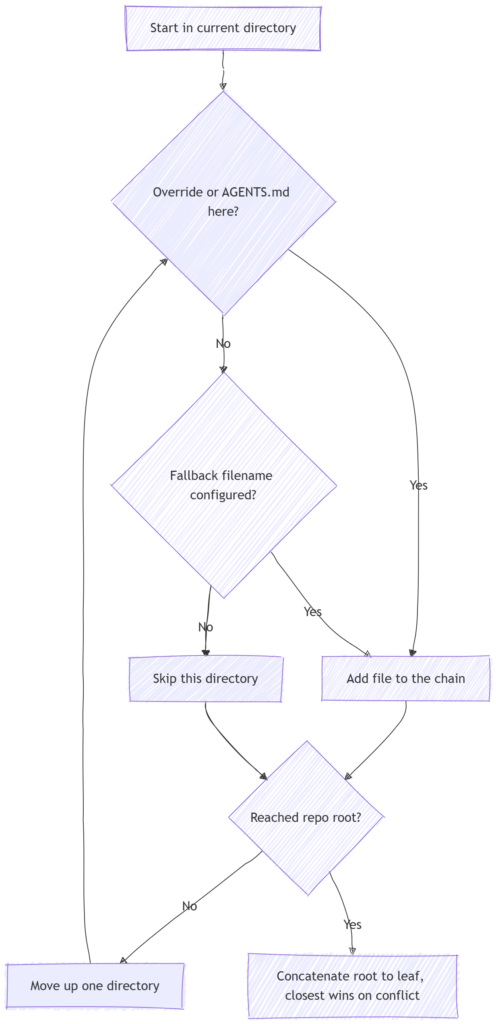
Nothing here deletes an ancestor’s file from context. “Wins” just means that when two files genuinely contradict each other, the one closer to where you’re working gets treated as more authoritative, because it lands later in the combined prompt. The one piece that’s a true override rather than a weighting is AGENTS.override.md — drop one next to an AGENTS.md at the same directory level, and Codex ignores the regular file entirely at that level. There’s also a hard ceiling, project_doc_max_bytes, 32 KiB by default, and Codex truncates silently past it — a detail that’s generated a fair number of confused bug reports from people who had no idea their carefully written instructions were getting cut off partway through.
Not every adopter works this way, either. Aider and Gemini CLI don’t discover AGENTS.md automatically at all — you point them at it explicitly, a read: AGENTS.md line in Aider’s config, a context.fileName setting in Gemini CLI’s. Three different philosophies living under one shared filename: automatic directory-walking, explicit opt-in, and, as it turns out, outright refusal.
The one notable holdout, and how to route around it
Which brings us to the part of this story that anyone using both Claude Code and Codex has probably already run into. Claude Code’s own answer is blunt: it reads CLAUDE.md and nothing else natively, with no automatic fallback to AGENTS.md if that’s all a repository has. Land in a Claude Code session in a repo that only has an AGENTS.md at the root, and Claude simply won’t look at it unless told to.
The documented fix is genuinely simple, at least. Add an @AGENTS.md import line inside your CLAUDE.md, and Claude expands it into context at launch exactly as if it were written inline — you can stack Claude-specific instructions underneath it in the same file:
@AGENTS.md

## Claude Code
Use plan mode for anything touching `app/worker/`.
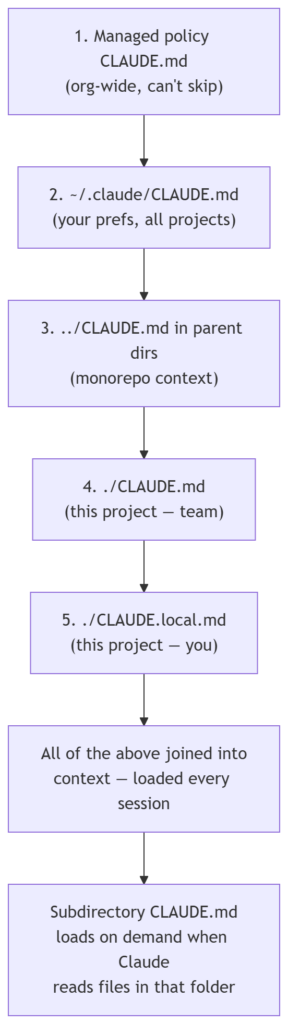
A symlink does the same job if there’s nothing Claude-specific to add: ln -s AGENTS.md CLAUDE.md. On Windows that needs admin rights or developer mode, so the import line is the safer default there. Newer versions push this further still — running /init with CLAUDE_CODE_NEW_INIT=1 set will read an existing AGENTS.md (along with Cursor, Copilot, Devin, and Windsurf rule files) while generating a CLAUDE.md, and /import pulls an AGENTS.md’s content, plus MCP servers, commands, and skills, straight into the matching CLAUDE.md in one pass.
Once you get past the naming, the two setups differ in some genuinely practical ways:
| OpenAI Codex | Claude Code | |
|---|---|---|
| Native filename | AGENTS.md, plus AGENTS.override.md for hard overrides | CLAUDE.md |
| How it finds guidance | Global file, then a walk from repo root to your working directory, one file per directory | Walks up from your working directory to the repo root, loading every CLAUDE.md along the way |
| On conflicting instructions | Closer-to-cwd content treated as more authoritative | Closer-to-cwd content read last, so it tends to carry more weight, but nothing is dropped |
| Size handling | Hard cap, 32 KiB by default; truncates silently past it | No hard cap — files load in full, though Anthropic’s own guidance says adherence drops past roughly 200 lines |
| Reads the other’s file natively? | No | No |
If I had to guess at the reasoning rather than just the mechanics: CLAUDE.md predates the point where AGENTS.md became a serious cross-vendor push, and it’s already load-bearing for things AGENTS.md was never scoped to handle, like the auto-memory system that lets Claude write its own notes back to disk between sessions. Merging the two formats outright would mean picking a lowest common denominator, and Anthropic already co-founded the foundation now stewarding AGENTS.md as a neutral standard elsewhere. Interoperability through an import line, instead of a forced merge, is a defensible way to split that difference. It’s just a genuine extra step for anyone maintaining both files across a mixed toolchain.
Two studies asked if it works. They didn’t fully agree.
Here’s where it gets more interesting than “add the file, get better output,” which is roughly the pitch every vendor has made for a year.
A 2026 preprint by Lulla and colleagues looked at efficiency: they ran agents on 124 real pull requests across 10 repositories, once with the repo’s actual AGENTS.md present and once without, measuring wall-clock time and token usage rather than whether the task got done. Their result was a median runtime drop of roughly 28.6% and an output-token drop of roughly 16.6% when the file was present, with task completion staying about the same either way. Same outcome, noticeably cheaper and faster to reach it — the result you’d expect if the file’s real job is cutting down on wasted exploration.
A few weeks later, a team from ETH Zurich, presenting at an ICLR workshop this year, published something closer to the opposite. Gloaguen and colleagues tested Claude Code, Codex, and Qwen Code across SWE-bench Lite and a new benchmark they built from 138 issues drawn from repositories that already had developer-written context files, comparing three conditions: no context file, an LLM-generated one, and the real developer-written one. Across the board, context files tended to lower task success rates slightly compared to having no file at all, while adding more than 20% to inference cost on average. LLM-generated files were the worse offenders, hurting success rates in five of the eight settings tested; developer-written ones landed closer to neutral, with secondary write-ups on the paper putting the gain at roughly 4%, still at a real cost premium. The agents weren’t ignoring the files, either — they followed the instructions closely. The files just didn’t reward that obedience with better outcomes on these particular tasks.
The two results aren’t as contradictory as they sound once you notice they’re measuring different things on different populations of repos. Lulla’s study asks whether an agent works more efficiently given that a file exists and was written by whoever actually maintains a well-established, popular repo, and finds yes. Gloaguen’s asks whether having any context file at all raises your odds of solving the task, largely on smaller, less-trodden repos, and finds not really, and sometimes the reverse. A follow-up paper attempting to reconcile the two suggested the gap comes down partly to how the guidance was produced and partly to whether the agent’s step budget was fixed or open-ended — neither original study varied that directly, so it’s a plausible explanation rather than a settled one.
My own read, for what it’s worth: none of this argues against having an AGENTS.md. It argues against two specific habits that happen to be extremely common — running an init script to auto-generate one and never touching it again, and letting a hand-written one grow for a year without anyone doing a pass to cut it back down. Both produce exactly the kind of bloated, generic, semi-stale file that both studies punished.
What actually earns a line in the file
There’s a rule of thumb going around, traced back to an engineer at Humanlayer and picked up widely since, that frontier models can follow something on the order of 150 to 200 instructions with real consistency, degrading from there. Every line in your AGENTS.md competes for space in that budget on every single request, whether or not it’s relevant to the task at hand. That argues for ruthlessness. One widely shared guide frames the honest minimum as three things: a one-sentence project description, your package manager if it isn’t the ecosystem default, and any build or test commands that aren’t standard. Everything else is a candidate for somewhere else — a nested AGENTS.md for a specific package, a linked doc for language-specific conventions, a skill if your tool supports them.
That habit of pushing detail elsewhere, sometimes called progressive disclosure, is worth taking seriously rather than treating as a nice-to-have. A root file that says TypeScript conventions live in docs/TYPESCRIPT.md only costs tokens when the agent is actually touching TypeScript. A root file that inlines forty lines of TypeScript conventions costs tokens on every task, including the ones where you’re editing a YAML config and couldn’t care less.
One tension worth naming directly, because guidance genuinely splits on it: point at real files (see App.tsx for routing) or describe capabilities instead (routes live at the top level)? Builder.io’s writeup leans toward pointing at real files and real examples, on the theory that a concrete pattern to copy beats an abstract description every time — and for a module boundary that’s been stable for a while, I think that’s right. But file paths drift, especially in a codebase where agents themselves are doing a meaningful share of the refactoring, and a stale pointer doesn’t fail quietly. It actively misleads a tool that trusts your documentation more than a person would. My own rule: point at specific files for patterns that have held steady for months, describe capabilities and domain concepts for anything still churning, and fix the pointer the moment a rename breaks it rather than waiting for the next big rewrite.
A second thing worth borrowing regardless of which side of that you land on: split instructions into what an agent can just do and what it should ask about first.
Allowed without asking: reading and listing files, running a single-file
typecheck, lint, or test
Ask first: installing packages, deleting files, running the full test
suite or a database migration
GitHub’s analysis of a few thousand real-world files found the same pattern in the ones that worked well: a specific job for the agent, exact commands rather than descriptions of commands, concrete examples of good output, explicit boundaries on what not to touch. Vague personas and vague rules were the common thread running through the ones that didn’t.
Here’s roughly the shape I’d want for a small backend service, condensed to what actually earns its place:
# AGENTS.md

This service ingests usage events and serves aggregated metrics over a small FastAPI app.

## Setup
- Python 3.12, dependencies via `uv sync` (not pip, not poetry)
- Local Postgres and Redis come up with `docker compose up -d`

## Commands
- Type check one file: `uv run mypy path/to/file.py`
- Run one test file: `uv run pytest tests/path/to_test.py -q`
- Full suite (ask first, it takes ~6 minutes): `uv run pytest`
- Migrations: `uv run alembic upgrade head`

## Conventions
- Async everywhere in `app/api/`; the worker in `app/worker/` stays sync
- New endpoints get a Pydantic response model, no raw dicts
- Follow the pattern in `app/api/routes/usage.py` for new routes

## Boundaries
- Never hand-edit files under `migrations/versions/`
- Ask before adding a new third-party dependency
- Don't touch retry logic in `app/worker/` without flagging it first — it's tuned against a real incident

## Before opening a PR
- `uv run ruff check --fix` and `uv run mypy` both clean
- Migrations included if models changed
Notice what isn’t there: no explanation of what FastAPI is, no directory listing, nothing about how Python imports work. An agent can find all of that on its own in about the time it takes to read past it, and every line spent telling it something it can discover is a line not spent on the two or three things it genuinely can’t know — like the fact that the worker’s retry logic is fragile for reasons buried in an incident report from months ago.
Write the three-line version first
The instinct, once you’ve read enough of these, is to sit down and write the comprehensive version in one sitting. Resist it. A file assembled from guesses about what an agent might need is exactly the shape the ETH Zurich study caught underperforming: generic, comprehensive, and only loosely connected to what the agent actually struggles with in your specific repo.
Write the three or four lines that are genuinely non-obvious. Then watch. The next time the agent trips over the same wrong assumption twice, that’s the signal to add one line, not a section. If you’re on Claude Code specifically, run /doctor against your CLAUDE.md every so often — it proposes trims to a checked-in file, and tellingly, the things it flags first are directory layouts and dependency lists, exactly the content an agent can rediscover on its own and shouldn’t have been costing you tokens on every session in the first place. The file that earns its place a year from now won’t look like the one you’d write today. It’ll be shorter, and every line left in it will have a scar behind it.