
Picture a platform team running a few hundred Lambda functions across a handful of accounts. Every function has several published versions kept around for safe rollbacks. One morning a deploy fails with a quota error, and the culprit isn’t the new function at all. It’s the 75 GB account-level limit on function and layer code storage, quietly filled up by copies of packages you thought lived in your own S3 bucket. If you’ve ever had to explain to a security reviewer why your deployment artifacts also sit in an internal bucket you can’t see, encrypt, or tag, this one is for you.

AWS has added a way to point Lambda at your own S3 bucket and have it read your code from there directly, with no hidden second copy.
What actually changed
There’s a new function configuration setting called S3ObjectStorageMode. It has two values.
- The default is
COPY, which behaves exactly like Lambda always has. If you don’t set the field at all, you get COPY, so nothing about your existing functions changes on its own. - The new value is
REFERENCE. Set it when you create or update a function, and Lambda stops copying your.zippackage into its internal storage. Instead it keeps a reference to your S3 object and reads the code from your bucket when it needs it. Your object becomes the one canonical artifact.
The feature works in all AWS standard regions where Lambda is available, and there’s no extra charge for it beyond the normal S3 storage and request costs you’d pay anyway.
How it works, old way and new
Under the old model (now COPY), the flow looks like this: you upload a .zip to your bucket, call CreateFunction or UpdateFunctionCode with the bucket name and object key, and Lambda pulls that artifact into a service-managed bucket. It builds the optimized, runnable version of your function from that internal copy. The catch is that this copy counts against your 75 GB account quota, and you have no say over how it’s stored.
With REFERENCE, that copy step disappears. Lambda records where your object lives and reads it directly. Two things fall out of that. First, your package no longer counts toward the 75 GB limit, because there’s no Lambda-side copy to count. Second, creating and updating functions gets faster, since Lambda skips the copy-into-internal-bucket step. AWS describes this as a faster time to first invoke for new functions and after updates.
Architecture
The diagram below contrasts the two modes and sketches the multi-account pattern that, in my experience, is the real reason to adopt this.

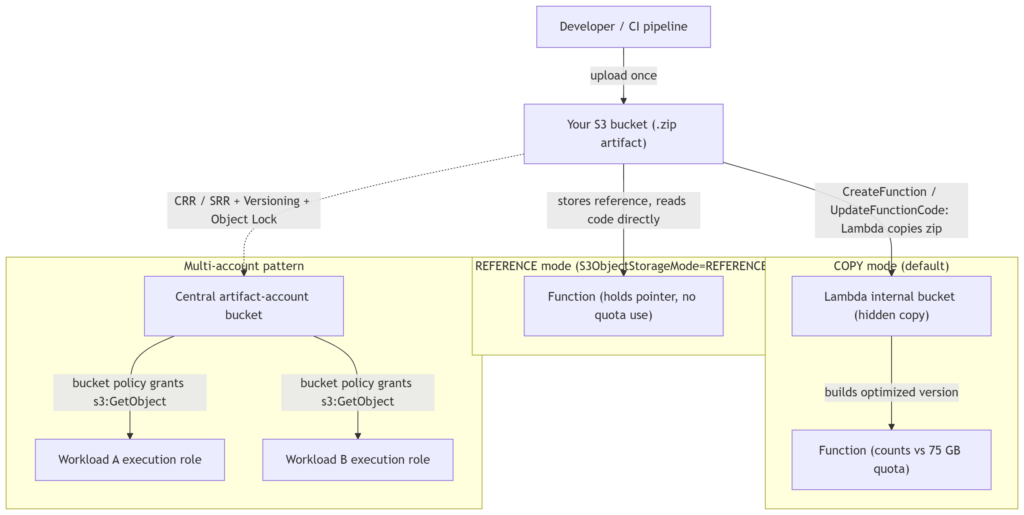
In a COPY deployment, the artifact exists twice: once in your bucket, once inside Lambda. In REFERENCE mode there’s a single object, and your function holds a pointer to it. Extend that to an organization and the shape gets interesting: put every artifact in one bucket in a central “artifact” or shared-services account, then grant s3:GetObject to each workload account’s Lambda execution role through the bucket policy. Now one bucket is the source of truth for what’s deployed everywhere, with one place to enforce encryption, versioning, and retention.
When to reach for it
- CI/CD and artifact management. Your pipeline uploads a package once, and the function references that same object. One set of lifecycle rules and access controls covers everything, and a rollback becomes “point the function at the previous S3 object version.”
- Multi-account, multi-team setups. Centralize artifacts in one account, hand out cross-account
s3:GetObjectvia bucket policies, and keep a single inventory of what code runs where. - Disaster recovery. Because you own the bucket, you can turn on Cross-Region Replication (CRR) or Same-Region Replication (SRR), and pair it with S3 Versioning and Object Lock to keep a tamper-resistant archive that survives an accidental delete or a corrupted deploy. See the S3 replication docs and S3 lifecycle examples.
- Quota and compliance pressure. If you’re brushing up against 75 GB, or you need your own encryption, access logging, Object Lock, or compliance tags on the artifact, this gives you that control.
When to leave it alone
For plenty of workloads, COPY is fine and simpler. If you aren’t near the quota, don’t need custom encryption or tagging on the artifact, and have no DR requirement on your deployment packages, there’s little reason to change anything. The default exists for a reason.
Security notes
- The trade in
REFERENCEmode is control for responsibility. You now own the bucket’s posture: its encryption, access policies, lifecycle transitions, and audit trail are yours to configure and to get right. - For cross-account access, you grant
s3:GetObjectto the calling function’s execution role in the bucket policy. - Versioning plus Object Lock is the combination worth setting up early if you care about a durable, tamper-proof code archive.
- The full IAM and bucket-policy details live in the Lambda developer guide.
Pricing
No additional charge for the feature. You pay the standard S3 storage and request costs for the object, which you were largely paying already if your artifacts lived in S3.
Limitations and open questions
It doesn’t state whether REFERENCE needs KMS decrypt permissions beyond s3:GetObject when you use customer-managed encryption (It should), exactly how a referenced object version is pinned for rollback, or what happens to a live function if the referenced object is later deleted or modified. Any latency effect from reading code directly at runtime isn’t discussed either. Confirm these against the Lambda console and the developer guide before you roll it out widely.
Bottom line
This is a small setting with an outsized effect for teams operating at scale. If the 75 GB quota or “we can’t audit that copy” has ever slowed you down, S3ObjectStorageMode: REFERENCE is worth a look. Start on a non-critical function, get your bucket policy and versioning right, and expand from there. Original announcement on the AWS Compute Blog.