Tag Archives: Lambda

Self-Managed S3 Buckets for Lambda Code: You Finally Own the Artifact


Picture a platform team running a few hundred Lambda functions across a handful of accounts. Every function has several published versions kept around for safe rollbacks. One morning a deploy fails with a quota error, and the culprit isn’t the new function at all. It’s the 75 GB account-level limit on function and layer code storage, quietly filled up by copies of packages you thought lived in your own S3 bucket. If you’ve ever had to explain to a security reviewer why your deployment artifacts also sit in an internal bucket you can’t see, encrypt, or tag, this one is for you.

S3 buckets for Lambda code!

AWS has added a way to point Lambda at your own S3 bucket and have it read your code from there directly, with no hidden second copy.

What actually changed

There’s a new function configuration setting called S3ObjectStorageMode. It has two values.

  • The default is COPY, which behaves exactly like Lambda always has. If you don’t set the field at all, you get COPY, so nothing about your existing functions changes on its own.
  • The new value is REFERENCE. Set it when you create or update a function, and Lambda stops copying your .zip package into its internal storage. Instead it keeps a reference to your S3 object and reads the code from your bucket when it needs it. Your object becomes the one canonical artifact.

The feature works in all AWS standard regions where Lambda is available, and there’s no extra charge for it beyond the normal S3 storage and request costs you’d pay anyway.

How it works, old way and new

Under the old model (now COPY), the flow looks like this: you upload a .zip to your bucket, call CreateFunction or UpdateFunctionCode with the bucket name and object key, and Lambda pulls that artifact into a service-managed bucket. It builds the optimized, runnable version of your function from that internal copy. The catch is that this copy counts against your 75 GB account quota, and you have no say over how it’s stored.

With REFERENCE, that copy step disappears. Lambda records where your object lives and reads it directly. Two things fall out of that. First, your package no longer counts toward the 75 GB limit, because there’s no Lambda-side copy to count. Second, creating and updating functions gets faster, since Lambda skips the copy-into-internal-bucket step. AWS describes this as a faster time to first invoke for new functions and after updates.

Architecture

The diagram below contrasts the two modes and sketches the multi-account pattern that, in my experience, is the real reason to adopt this.

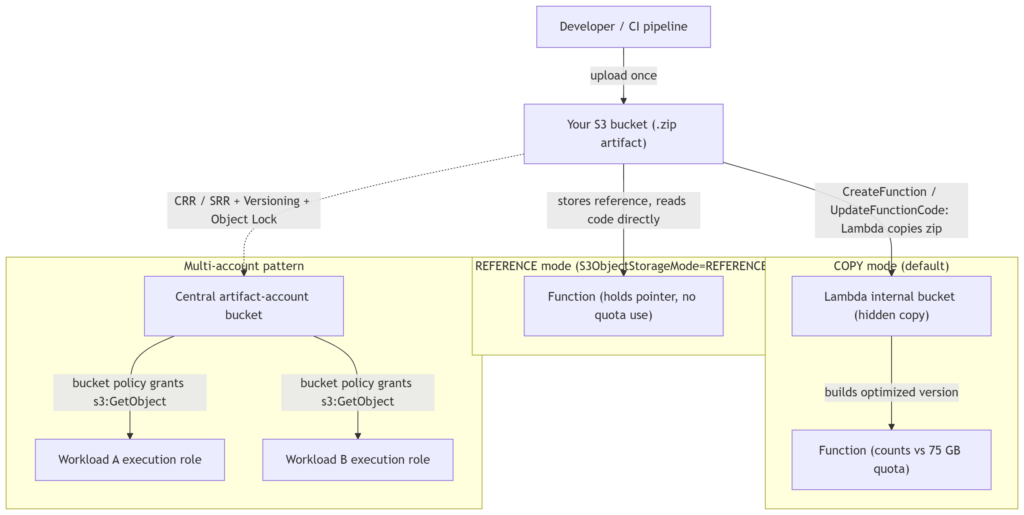
Two modes for S3 buckets of Lambda code.

In a COPY deployment, the artifact exists twice: once in your bucket, once inside Lambda. In REFERENCE mode there’s a single object, and your function holds a pointer to it. Extend that to an organization and the shape gets interesting: put every artifact in one bucket in a central “artifact” or shared-services account, then grant s3:GetObject to each workload account’s Lambda execution role through the bucket policy. Now one bucket is the source of truth for what’s deployed everywhere, with one place to enforce encryption, versioning, and retention.

When to reach for it

  • CI/CD and artifact management. Your pipeline uploads a package once, and the function references that same object. One set of lifecycle rules and access controls covers everything, and a rollback becomes “point the function at the previous S3 object version.”
  • Multi-account, multi-team setups. Centralize artifacts in one account, hand out cross-account s3:GetObject via bucket policies, and keep a single inventory of what code runs where.
  • Disaster recovery. Because you own the bucket, you can turn on Cross-Region Replication (CRR) or Same-Region Replication (SRR), and pair it with S3 Versioning and Object Lock to keep a tamper-resistant archive that survives an accidental delete or a corrupted deploy. See the S3 replication docs and S3 lifecycle examples.
  • Quota and compliance pressure. If you’re brushing up against 75 GB, or you need your own encryption, access logging, Object Lock, or compliance tags on the artifact, this gives you that control.

When to leave it alone

For plenty of workloads, COPY is fine and simpler. If you aren’t near the quota, don’t need custom encryption or tagging on the artifact, and have no DR requirement on your deployment packages, there’s little reason to change anything. The default exists for a reason.

Security notes

  • The trade in REFERENCE mode is control for responsibility. You now own the bucket’s posture: its encryption, access policies, lifecycle transitions, and audit trail are yours to configure and to get right.
  • For cross-account access, you grant s3:GetObject to the calling function’s execution role in the bucket policy.
  • Versioning plus Object Lock is the combination worth setting up early if you care about a durable, tamper-proof code archive.
  • The full IAM and bucket-policy details live in the Lambda developer guide.

Pricing

No additional charge for the feature. You pay the standard S3 storage and request costs for the object, which you were largely paying already if your artifacts lived in S3.

Limitations and open questions

It doesn’t state whether REFERENCE needs KMS decrypt permissions beyond s3:GetObject when you use customer-managed encryption (It should), exactly how a referenced object version is pinned for rollback, or what happens to a live function if the referenced object is later deleted or modified. Any latency effect from reading code directly at runtime isn’t discussed either. Confirm these against the Lambda console and the developer guide before you roll it out widely.

Bottom line

This is a small setting with an outsized effect for teams operating at scale. If the 75 GB quota or “we can’t audit that copy” has ever slowed you down, S3ObjectStorageMode: REFERENCE is worth a look. Start on a non-critical function, get your bucket policy and versioning right, and expand from there. Original announcement on the AWS Compute Blog.
Lambda MicroVMs: When Functions Aren’t Enough and EC2 Is Too Much

Picture this: you’re building a browser-based notebook where data analysts paste in Python, load a 3 GB dataframe, generate a few charts, then wander off to a meeting. Ninety minutes later they come back and expect their kernel, their variables, and their half-finished plot to still be sitting there.

AWS Lambda MicroVMs

Now try to build that on what AWS gave you before June 2026. Lambda? Fifteen-minute execution ceiling, no persistent process between invocations, no way to hold that dataframe in memory across the analyst’s coffee break. ECS or EC2? Sure, but now you’re running per-user containers or VMs, paying for idle capacity, and writing your own scheduler to reap dead sessions. Fargate gets you closer, but you still own the isolation story when the code being run was generated by an LLM you can’t fully trust.

This is the gap Lambda MicroVMs is aimed at.

What actually launched

AWS Lambda MicroVMs is a new compute primitive that exposes the Firecracker virtualization layer (the same one that has always run underneath Lambda) as something you can address directly. You get per-instance hardware isolation, snapshot-based startup, and — this is the part that matters — the ability to keep a single execution environment alive for an entire working session rather than a single request.

Alongside it, AWS shipped a companion resource called the Lambda Network Connector (LNC), which is how you attach a MicroVM to a private VPC when you need it to reach a database or an internal API.

How it actually works

Two resource types, and once you understand these the rest falls into place:

  • MicroVM image: a versioned artifact you build from a Dockerfile. When you create one, the service runs your Dockerfile, boots your application inside a MicroVM, and takes a Firecracker snapshot of the memory and disk state. Think of it as a “warm” image — dependencies already imported, JIT already warmed, whatever init your app does already done.
  • MicroVM: an instance launched from that image. Because it’s restored from a snapshot rather than cold-booted, it comes up close to instantly.

Each MicroVM gets its own HTTPS endpoint, and that endpoint speaks to individual ports on the guest — plain HTTPS, WebSockets, and gRPC all work, so you connect to it the same way you’d connect to any container you were running yourself.

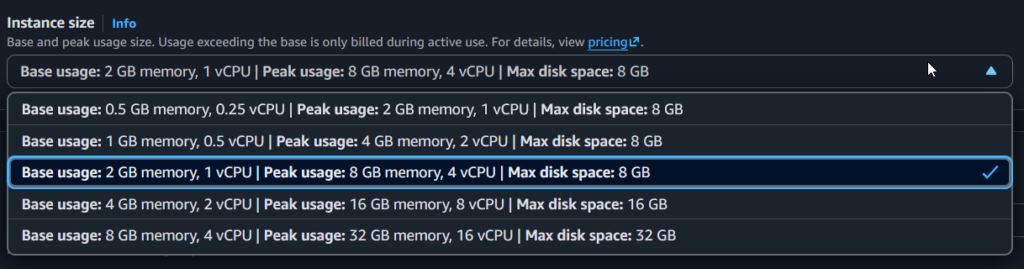
On sizing: the default baseline is 2 GB of memory and 1 vCPU. You can configure that up to 8 GB and 4 vCPUs at launch, with vCPU pinned to memory at a 2:1 ratio (memory in GB is double the vCPU count). From whatever baseline you pick, a MicroVM will auto-scale vertically up to 4x during peak demand. Horizontally, the service claims you can launch several hundred MicroVMs inside a minute.

Lambda MicroVMs Instance Sizes

Sessions can run from a few minutes up to eight hours. Egress to the public internet works out of the box; VPC access requires the LNC.

Architecture

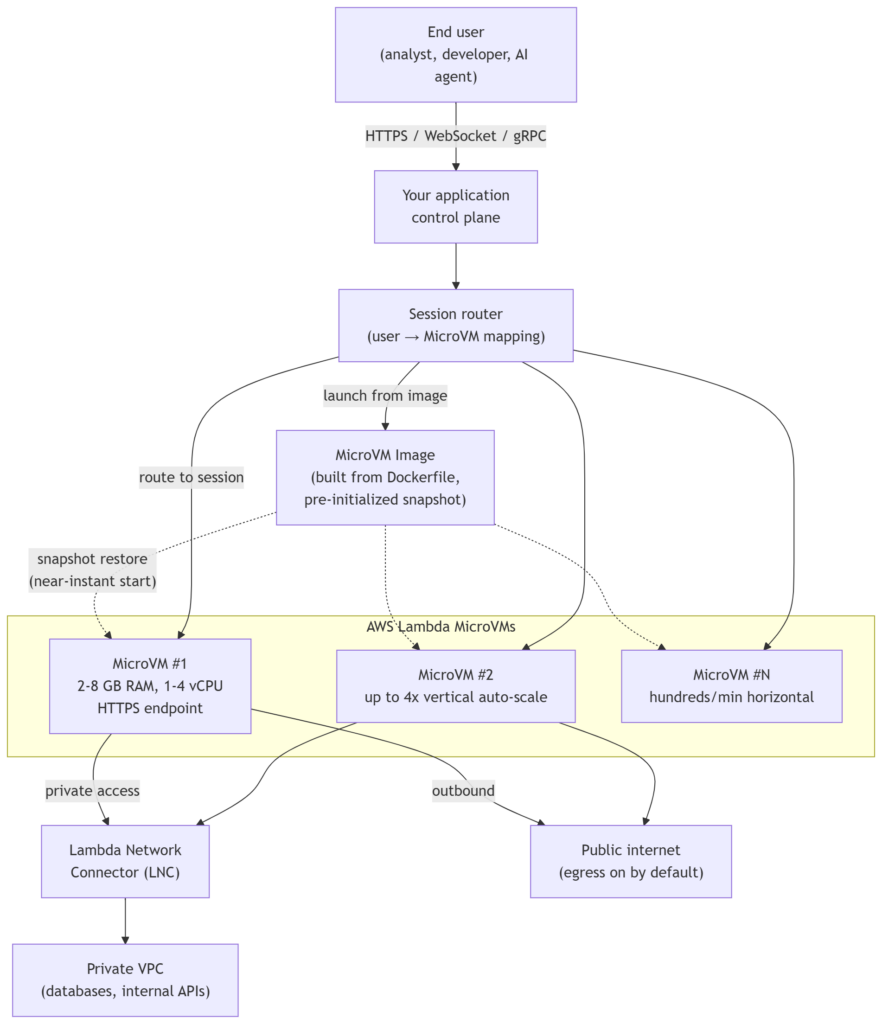
See the diagram below. The pattern is the per-session model: user requests come into your control plane, the control plane looks up whether that user already has a live MicroVM, and either routes traffic to the existing HTTPS endpoint or launches a new instance from a MicroVM image. When the user goes idle, you decide the lifecycle — keep it warm, snapshot it, or let it go.

AWS Lambda MicroVMs Flow

The interesting design question isn’t really “how do I launch a MicroVM” — it’s “who owns the session-to-endpoint mapping, and what’s my policy when the user disconnects?” You will end up building a small state machine. Plan for it.

When this is the right tool

  • Browser-based IDEs, notebooks, and the current wave of vibe-coding platforms — anywhere users bring their own code and expect their environment to feel persistent.
  • Analytics platforms running user- or LLM-generated queries where the working set is large and the session is long.
  • AI coding assistants that iterate on generated code and want to hold context between iterations, including RL-style loops that spin environments up and down to compare execution paths.
  • Security and vulnerability scanning where you need real isolation between scans and sometimes elevated OS privileges inside the guest.
  • CI/CD build and test runners where each job wants a clean, isolated box that starts fast.

When it probably isn’t

The launch material doesn’t call out anti-patterns directly, so treat this as my read rather than AWS’s guidance:

  • If your workload is stateless per-invocation and short, regular Lambda is still simpler and cheaper reasoning-wise.
  • If you need more than 8 GB of memory or 4 vCPUs per instance, you’re outside the MicroVM baseline envelope and you should look at Fargate or EC2.
  • If your sessions genuinely need to outlive eight hours without a snapshot/resume, this isn’t your primitive either.

Security notes worth reading twice

The isolation story is genuinely strong — hardware-level, one guest per user or job, which is the whole point of using Firecracker as a primitive rather than just a container runtime. That’s what makes it defensible as a sandbox for untrusted or model-generated code.

Two things to design around, though.

  1. First, outbound internet access is on by default. If you’re running untrusted code, you almost certainly want egress controls, and the launch material doesn’t spell out how granular those are — treat this as a question to answer before you go to production.
  2. Second, private VPC connectivity is not a checkbox; it requires configuring an LNC. Factor that into your networking design early, not late.

Pricing

Lambda MicroVMs are priced per instance-second. Check the Lambda pricing page (MicroVMs tab) before you commit to a design, especially for long-lived sessions — an eight-hour idle MicroVM has very different economics from a 200 ms function invocation.

Limitations to keep on the whiteboard

  • 2 GB / 1 vCPU baseline, 8 GB / 4 vCPU max, 2:1 memory-to-vCPU ratio.
  • Vertical auto-scale capped at 4x baseline.
  • Horizontal scale advertised as “several hundred per minute” during spikes — quantify this against your own burst profile before betting on it.
  • Sessions in the “few minutes to 8 hours” range; the exact hard upper bound isn’t explicitly stated.
  • VPC access is opt-in via LNC.

Wrapping up

The most useful way to think about Lambda MicroVMs is that AWS unbundled Firecracker from Lambda’s request/response model and let you address it directly, while keeping the parts of Lambda that were actually pleasant — no capacity planning, no patching, no scheduler to write. If you’ve been building per-user sandboxes on top of ECS or bare EC2 and feeling like you were re-implementing Firecracker badly, this is the primitive to evaluate.

Start with the product page and the developer guide, and if snapshot-based startup is new to you, the older SnapStart post is worth a read for the mental model. Networking details live in the LNC docs, and quotas are on the service limits page. And refer to this AWS Blog which walk you through AWS MicroVms.