
If you’ve spent any time around technology in the last couple of years, you’ve heard the word “agent” thrown around a lot — usually with more excitement than precision. This post is an attempt to fix that. I’ll explain what an AI agent actually is, when you should (and shouldn’t) reach for one, how they work under the hood, the vocabulary you’ll keep bumping into, and the two things that decide whether an agent project succeeds in production: cost and safety.

I’ve written it to be readable if you’re brand new to AI, while still being concrete enough for an IT professional who has to make systems, design or architecture decisions.
First, what is an “agent”?
The idea is older than the current AI wave. In classic computer science, an intelligent agent is defined as “an entity that perceives its environment, takes actions autonomously to achieve goals, and may improve its performance through machine learning or by acquiring knowledge” (Wikipedia). That textbook framing — perceive, decide, act — still holds today.
The modern, cloud-vendor version says much the same thing in plainer words. AWS defines an AI agent as “a software program that can interact with its environment, collect data, and use that data to perform self-directed tasks that meet predetermined goals” (AWS). The key word is self-directed: you give it a goal, not a step-by-step script.
What’s new is the brain. In today’s agents, the control flow is “frequently driven by large language models” (Wikipedia). The LLM is what lets the agent understand a fuzzy instruction in plain English, decide what to do next, and adapt when things don’t go as planned.
The one distinction that clears up most confusion: workflows vs. agents
Here’s the single most useful mental model I’ve found, from Anthropic’s engineering team. They separate “agentic systems” into two categories:
- Workflows are “systems where LLMs and tools are orchestrated through predefined code paths.”
- Agents are “systems where LLMs dynamically direct their own processes and tool usage, maintaining control over how they accomplish tasks” (Anthropic).
In a workflow, you wrote the flowchart and the LLM fills in the boxes. In an agent, the model decides the flowchart at runtime. That difference drives everything else — predictability, cost, and risk all shift when you hand the steering wheel to the model.
How an agent actually works
Strip away the hype and most LLM agents are, in Anthropic’s words, “just LLMs using tools based on environmental feedback in a loop” (Anthropic). That loop is the whole thing:

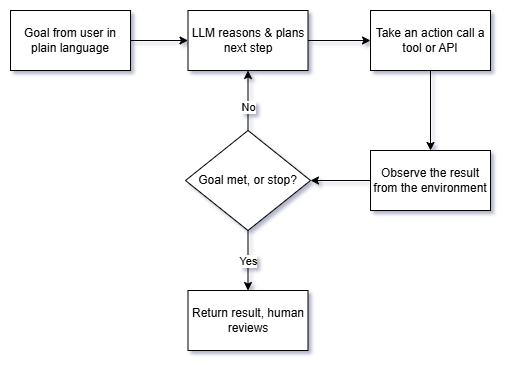
Walking through it the way AWS frames the process — determine the goal, acquire information, implement tasks, then evaluate outcomes and adjust (AWS):
- Goal in. A person gives the agent a task in natural language. A good agent will pause to clarify an ambiguous request before charging ahead.
- Reason and plan. The LLM decides what the next step should be.
- Act via a tool. The agent does something in the real world — queries a database, calls an API, runs code, sends an email.
- Observe. Critically, the agent must “gain ‘ground truth’ from the environment at each step (such as tool call results or code execution) to assess its progress” (Anthropic). This feedback is what separates an agent from a chatbot that just guesses.
- Loop or stop. It repeats until the goal is met or a stopping condition trips.
The building block: an “augmented LLM”
The atom of every agent is what Anthropic calls the augmented LLM — a language model enhanced with three capabilities: retrieval, tools, and memory (Anthropic). Modern models can actively generate their own search queries, pick the right tool, and decide what information is worth keeping. AWS describes a similar architecture: a foundation model, a planning module, a memory module, tool integration, and a learning/reflection mechanism (AWS).
The vocabulary you’ll keep hearing
Tools. A tool is anything the agent can call to affect or observe the world — a search API, a calculator, a code interpreter, a database query. The quality of your tool descriptions matters more than people expect. Anthropic recommends “poka-yoke” design (a manufacturing term for mistake-proofing) — writing tool parameters and descriptions so clearly, with examples and edge cases, that it’s hard for the model to misuse them (Anthropic).
Skills. A newer concept worth knowing: Skills are “folders that include instructions, scripts, and resources that Claude can load when needed” (Anthropic). They work through progressive disclosure — the agent scans available skills, and “when one matches, it loads only the minimal information and files needed,” which keeps it fast while still having specialized expertise on tap. Skills are composable (they stack), portable (“build once, use across Claude apps, Claude Code, and API”), and efficient because they only load what’s needed, when it’s needed (Anthropic). Think of a skill as a reusable competency you can hand to an agent, rather than cramming everything into one giant prompt.
MCP (Model Context Protocol). As soon as you want an agent to talk to real systems, you hit an integration problem: every tool has its own API. MCP is “an open-source standard for connecting AI applications to external systems.” The docs use a nice analogy — “think of MCP like a USB-C port for AI applications,” a standardized way to plug an agent into data sources, tools, and workflows (MCP). For IT teams, the appeal is “build once and integrate everywhere” instead of writing a bespoke connector per tool.
Memory. Agents distinguish between short-term memory (the current task’s context) and longer-term memory (things worth keeping across sessions). It’s one of the augmented-LLM enhancements above, and one of AWS’s core architecture components (AWS).
Multi-agent systems. Instead of one agent doing everything, you can have several specialized agents collaborate. Both the classical taxonomy and AWS list multi-agent systems as a category (Wikipedia; AWS). Anthropic’s orchestrator-workers pattern is a concrete version: a central LLM breaks a task into subtasks, delegates them, and synthesizes the results (Anthropic).
A quick note on “types of agents”
If you read the academic material, you’ll see five classical classes: simple reflex, model-based reflex, goal-based, utility-based, and learning agents (Wikipedia). AWS extends the list with hierarchical and multi-agent systems (AWS). You don’t need to memorize these, but they’re a useful reminder that “agent” is a spectrum of autonomy, not a single thing.
When to use an agent — and when not to
This is the section I wish more people read first. The honest guidance from Anthropic is to resist building an agent until you actually need one: “find the simplest solution possible, and only increasing complexity when needed.” Agentic systems “typically increase latency and costs while improving task performance,” so it’s a genuine trade-off, not a free upgrade. In fact, for many applications, “optimizing single LLM calls with retrieval and in-context examples is usually enough” (Anthropic).
A practical way to decide:
- Use a workflow when the task is well-defined and you value predictability. If you can draw the flowchart yourself, hard-code it.
- Use an agent when flexibility and model-driven decision-making are essential — the path can’t be known in advance, and the number of possible steps is large (Anthropic).
Common patterns that sit between a single prompt and a full agent are worth knowing, because they often solve the problem more cheaply: prompt chaining (sequential steps with checkpoints), routing (classify an input and send it to a specialist), parallelization (split work up, or run it several times and vote), orchestrator-workers, and evaluator-optimizer (one model generates, another critiques, in a loop) (Anthropic). My advice: try to solve your problem with one of these before you reach for full autonomy.
Keeping costs under control
Because agents run the LLM in a loop and call tools repeatedly, cost and latency are design concerns from day one, not afterthoughts. The trade-off is baked in — more autonomy means more model calls (Anthropic). Grounded in the sources above, here’s how to keep the bill sane:
- Don’t build an agent you don’t need. The cheapest agent is the one you avoided by using a single well-designed LLM call, a retrieval step, or a fixed workflow instead (Anthropic).
- Set stopping conditions. Anthropic explicitly recommends limits like a maximum number of iterations so an agent can’t loop forever and quietly run up cost (Anthropic). This is the single most important cost guardrail.
- Load only what’s needed. This is exactly why progressive disclosure in Skills matters — it “only loads what’s needed, when it’s needed” instead of stuffing every instruction into context on every call (Anthropic). Less context per call means lower token cost.
- Match the pattern to the task. A routing step that sends easy requests down a cheaper path, and only hard ones to the expensive full-agent path, can cut cost dramatically (Anthropic).
A caveat, so I don’t overstate things: specific pricing, token rates, and model-tier costs change constantly and depend on your provider. Check the current pricing page for whatever model you use — I’m deliberately not quoting numbers the sources didn’t give me.
Security, guardrails, and human oversight
Handing an autonomous system access to your tools and data is a real risk surface, and the sources are consistent about how to manage it: test in isolation, constrain what the agent can do, and keep a human in the loop.
- Test in a sandbox. Anthropic calls “extensive testing in sandboxed environments” essential before you let an agent loose (Anthropic). Give it a safe playground before it touches production.
- Design tools to prevent mistakes. The poka-yoke principle again — make dangerous or ambiguous tool use structurally hard, not just discouraged (Anthropic).
- Use platform guardrails. Managed services provide built-in safety layers; AWS points to “Amazon Bedrock Guardrails” as an example of built-in security for agents (AWS).
- Keep humans in the loop. Agents should be able to pause for human feedback “at checkpoints or when blocked” (Anthropic), and human review remains a core safeguard against biased or inaccurate output (AWS). For anything irreversible — sending money, deleting data, emailing customers — a human approval step is not optional.
If you take one security principle away: an agent should never have a capability you wouldn’t hand to a brand-new employee on their first day without supervision.
Bringing it together
Here’s the whole picture in one view:
- An AI agent takes a goal in plain language and pursues it self-directedly.
- Under the hood it’s an augmented LLM (model + tools + memory + retrieval) running a perceive → reason → act → observe loop.
- Skills package reusable expertise; MCP standardizes how the agent connects to the outside world; multi-agent setups split work across specialists.
- Reach for an agent only when a simpler workflow won’t do — autonomy costs latency and money.
- Stopping conditions, sandboxing, and human oversight are what make the whole thing safe to run.
The technology is genuinely useful, but the teams who succeed with it are the ones who stay skeptical: they start simple, add autonomy only where it earns its keep, and never let an agent act unsupervised on anything that’s hard to undo.