
The credential leaks that actually make it into a postmortem tend to follow the same shape. A secret that was supposed to exist in exactly one place ends up existing in four: a .tfvars file someone forgot to delete, a CI log that echoed an environment variable during a failed-deploy debugging session, a state file with the value sitting in plaintext because Terraform needed it to create a resource, and the running container, which is the only place it was actually meant to be.

None of the tooling in this space is really about generating or storing a string securely. That part’s not hard. What’s hard is controlling how many places that string touches on its way from “created” to “used by a workload,” and closing off every one of those places except the last.
The map
A secret’s actual path through a modern deployment crosses four systems, and each one leaks it in its own particular way: the infrastructure-as-code tool that provisions the store, the CI/CD or GitOps engine that ships the workload, the store itself, and the runtime platform the workload runs on.

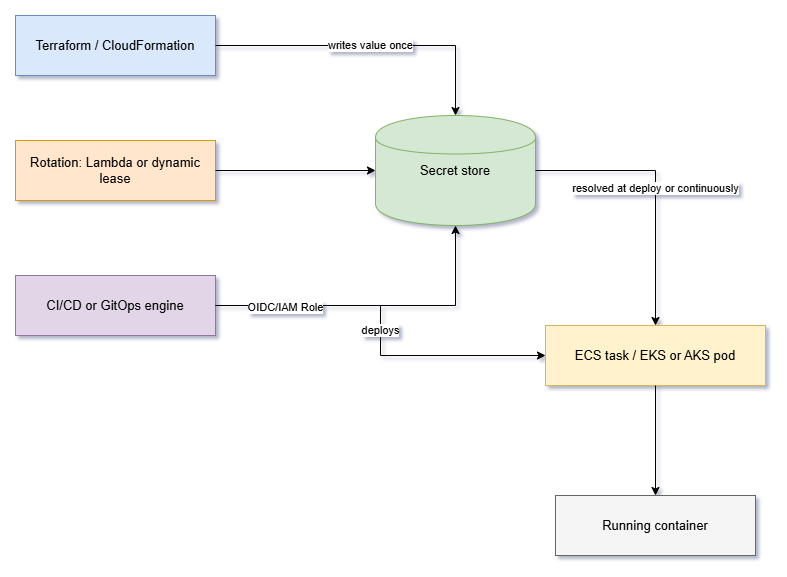
Almost every incident I’ve dug into traces back to one of those four boundaries being noticeably weaker than the other three. Hardening one while ignoring the rest doesn’t close the leak, it just relocates it.
Infrastructure as code: the tool that provisions the vault, imperfectly
CloudFormation and Terraform dominate this layer for AWS-centric shops, and they fail in genuinely different ways.
CloudFormation’s answer is dynamic references: a string like {{resolve:secretsmanager:secret-id:SecretString:json-key}} that CloudFormation resolves at deploy time instead of you typing a password into a template. Pair that with the NoEcho attribute on the parameter and the value won’t print in the console or in describe-stacks. It’s a solid pattern with one sharp edge: NoEcho hides the value, it doesn’t encrypt it, and it offers no protection against someone who already has stack-read permissions. CloudFormation also won’t resolve a dynamic reference inside resource metadata like AWS::CloudFormation::Init, because that would print the secret straight to the console anyway. It’s a small but telling detail about where the real exposure risk actually sits. One advantage CloudFormation has by default: there’s no separate state file for you to secure, because the state lives inside the service.
Terraform’s version of this problem is structural rather than incidental. Mark a variable sensitive = true and Terraform redacts it from your terminal, your plan output, and your CI logs. It does nothing to the state file. Any sensitive value that becomes a resource attribute — a database password, an environment variable on a Lambda function — lands in terraform.tfstate in plain text regardless of how you flagged it, because Terraform needs the real value there to detect drift. Explaining that distinction to a team that assumed the sensitive flag was doing more than it actually does is a conversation most Terraform users eventually have.
For years the honest answer was: encrypt your state backend, restrict who can read it, and treat the state file itself as sensitive data. That’s still correct, but it’s no longer the whole story. Terraform 1.10 introduced ephemeral values, and 1.11 extended that to write-only arguments on managed resources, and together they’re an actual fix rather than a mitigation. An ephemeral resource fetches a value (a secret from Vault, a freshly generated password) and Terraform uses it during the apply without ever writing it to plan or state. A write-only argument, password_wo instead of password, accepts that ephemeral value directly on a resource like aws_db_instance, and the value is gone the moment the apply finishes. If you’re standing up new Terraform configurations this year, there’s not much reason to keep pulling secrets through a data source and hoping your state encryption is strong enough. The one thing worth planning for: migrating an existing attribute to its _wo form can trigger a resource replacement depending on the provider, so treat that migration like a credential rotation and test it somewhere that isn’t production.
CI/CD and GitOps are solving two different secret problems
People use “CI/CD” and “GitOps” almost interchangeably, but they hand secrets to infrastructure in opposite directions, and that difference matters more than which specific tool you’ve standardized on.
A CI/CD pipeline (GitHub Actions, Jenkins, Azure DevOps, or Spacelift running your Terraform) is push-based. Something happens, a runner spins up somewhere outside your infrastructure, that runner needs credentials to reach into your cloud account and your secret store, and then it pushes a change. The secret problem here is entirely about the runner: how does this ephemeral, often shared compute prove who it is without you handing it a long-lived key it might leak in a stray log line?
GitOps (Argo CD, Flux) is pull-based. An agent already lives inside the cluster and continuously reconciles actual state against what’s declared in Git. There’s no discrete pipeline-run moment to inject a secret from outside; the reconciler has to fetch it itself, from inside the cluster, and Git can never hold the plaintext value because Git is exactly where everyone with repo access can see it. That’s a different problem than “authenticate a runner,” which is why GitOps secret tooling looks nothing like CI/CD secret tooling.
On the CI/CD side, most of the industry has converged on the same answer: stop handing runners long-lived cloud credentials at all. GitHub Actions federates over OIDC: the workflow requests a short-lived token from GitHub’s own identity provider, and an IAM role’s trust policy accepts that token only from specific repositories, branches, or environments. No access key sits in GitHub Secrets waiting to be exfiltrated by a compromised dependency. Azure DevOps gets most of the way there with federated service connections, though the pattern I still see most often is a variable group linked to an Azure Key Vault: the group stores secret names rather than values and pulls the live value from the vault at queue time, so a vault outage fails the run early instead of mid-deploy. One thing that catches people off guard the first time: a variable group can’t link to a Key Vault that uses Azure RBAC for its permission model — the vault has to be running the older access-policy model instead. If secrets change often enough that a queue-time pull isn’t fresh, the AzureKeyVault@2 task reads the vault mid-run instead, at the cost of an extra step in every pipeline.
Jenkins is the odd one out because it predates all of this, and the right way to hand it secrets depends entirely on where the agents actually run. Agents on Kubernetes should use Vault’s Kubernetes auth method and let the pod’s own service account token do the authenticating. Agents on long-lived VMs typically use AppRole instead. The Vault plugin for Jenkins handles the retrieval and masks secrets in the build log, but “the plugin masks it” is a claim worth being a little skeptical of. An advisory against the plugin found that masking silently failed for secrets printed from shell steps on an agent when a specific durable-task logging mode was enabled; a workaround shipped in a related credentials plugin, but the underlying issue was still open at the time the advisory was published. The lesson generalizes past this one CVE: log masking is a convenience feature, not a security boundary, and you should assume that anything a build step can print, eventually it will.
Spacelift, which is closer to purpose-built CI/CD for Terraform than a general-purpose runner, handles this with contexts: reusable bundles of environment variables and mounted files attached to one or many stacks. Mark a variable or a mounted file as secret and it’s hidden from the UI and the API, visible only to the run itself. It composes nicely with Terraform’s own write-only arguments — Spacelift keeps the value out of its dashboard, Terraform keeps it out of state, and neither tool has to do the other’s job.
On the GitOps side, three patterns cover almost every cluster I’ve come across, and they trade off differently enough that picking one is a real decision rather than a coin flip.
| Approach | Where the secret lives | Rotation | Best fit |
|---|---|---|---|
| Sealed Secrets | Encrypted in Git, decrypted only by an in-cluster controller | Manual, no external store to poll | Small teams with no existing secret store, comfortable with cluster-key lock-in |
| SOPS | Encrypted in Git via KMS or age | Manual re-encryption on change | Config that spans Kubernetes and non-Kubernetes systems |
| External Secrets Operator | Referenced in Git; the real value stays in Vault, Secrets Manager, or Key Vault | Automatic, on a sync interval | Teams that already run a real secret store and want rotation to just work |
I’ve moved teams off Sealed Secrets more than once, and it’s rarely about the encryption being weak. It’s that the cluster’s private key becomes a single point of failure people forget about until they’re migrating clusters and discover nothing sealed two years ago can be unsealed anywhere else. External Secrets Operator avoids that by keeping Git as a set of pointers instead of a vault substitute, which is honestly the more defensible GitOps posture: Git should describe which secret a workload needs, not contain it in any form.
The stores themselves: what you’re actually paying for
AWS Secrets Manager, Azure Key Vault, and HashiCorp Vault all do the core job (encrypted storage, access control, an audit trail) well enough that the choice usually comes down to which cloud you’re already committed to, plus one real conceptual difference.
Secrets Manager and Key Vault are, underneath the branding, secured key-value stores with a rotation feature bolted on. That’s not a criticism. For a team running in one cloud, storing mostly static credentials and rotating them on a schedule, that’s exactly the right amount of tool, and you get IAM or Entra ID integration for free instead of standing up a separate identity story.
Vault’s dynamic secrets are the actual differentiator, and they change the security model rather than just the storage location. Instead of storing a long-lived database password and rotating it on a schedule, Vault’s database engine creates a brand-new database user with a short lease every time a workload asks for one, and revokes it the moment the lease expires or the workload shuts down. Most of the time, there is no standing credential to steal, because most of the time there isn’t a credential at all. That’s a genuinely stronger posture, but it comes with real operational weight: an engine to configure per database type, lease-renewal logic your applications need to handle, and a Vault cluster that now needs its own high availability, because your workloads can’t start without it. I’d only take that on if you’re actually going to use dynamic secrets for something: databases, cloud IAM, PKI certificates. If you’re going to end up storing mostly static values and checking a rotation box, you’ve built a more complicated Secrets Manager, not a better one.
Getting the secret into a running container
This is where the container platform’s own identity model decides how much of the pain above you actually feel.
ECS keeps it simple by splitting responsibility across two IAM roles that get conflated constantly the first few times someone sets this up: the execution role, which the ECS agent assumes to pull the image from ECR and to resolve any secrets block in the task definition (calling Secrets Manager or SSM Parameter Store before the container even starts), and the task role, which the application itself assumes at runtime for everything else. Put the secret permission on the task role instead of the execution role and the container just fails to start, with an error message that doesn’t always point at which role is missing what.
EKS and AKS have more moving parts because Kubernetes wasn’t originally built with cloud IAM in mind, so there’s a federation step before you even reach the secret. On EKS, that step used to mean IRSA exclusively (mapping a Kubernetes service account to an IAM role through the cluster’s OIDC provider), and IRSA still works and remains the practical choice for Fargate and Windows node groups. But EKS Pod Identity, generally available since late 2023, has become the default recommendation for new EC2-based clusters: no per-cluster OIDC provider to wire up, a universal trust policy instead of one keyed to each cluster’s issuer URL, and IAM session tags for namespace and service account applied automatically. Once that identity exists, the actual secret retrieval is usually External Secrets Operator syncing a value from Secrets Manager or Vault into a native Kubernetes Secret on an interval, or the Secrets Store CSI driver mounting it as a volume without ever materializing a Kubernetes Secret object. That’s a real difference if you’re trying to keep secrets out of etcd entirely. AKS follows the same shape with its own managed identity and CSI driver combination, including autorotation that polls Key Vault every two minutes by default and updates the mounted file and any synced Secret without a pod restart.
If you’re running EKS on mostly EC2 node groups and still wiring up IRSA for new workloads out of habit, that’s worth a second look. Pod Identity isn’t dramatically more secure by itself, but it removes an entire category of trust-policy maintenance that scales badly past one or two clusters.
Rotation: the step most projects only half-finish
Storing a secret securely and rotating it are different problems, and plenty of “secrets management” initiatives quietly solve only the first one.
AWS Secrets Manager’s rotation runs through a Lambda function that Secrets Manager calls in four steps on a schedule, and the mechanics explain why it can be close to zero-downtime instead of a coordinated cutover.

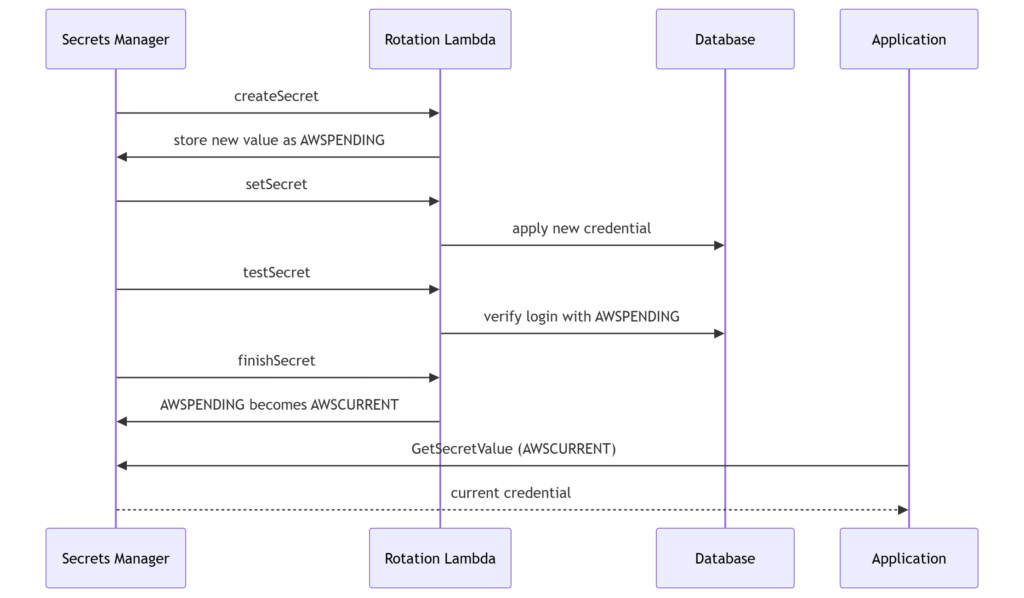
Secrets Manager tracks versions with staging labels instead of overwriting anything in place. AWSCURRENT is whatever your application is using right now. A new version is created and labeled AWSPENDING while createSecret and setSecret do the actual work of generating a new credential and pushing it to the database or service, and only once testSecret confirms the new credential logs in does finishSecret flip the labels: AWSPENDING becomes the new AWSCURRENT, and the old current version becomes AWSPREVIOUS. Nothing reading the secret mid-rotation ever sees a half-updated value, because the label that matters doesn’t move until the new credential is proven to work.
Vault handles rotation by mostly avoiding the need for it. Dynamic secrets carry a short lease instead of a rotation schedule, so “rotation” for a database credential is really Vault refusing to hand out a lease longer than its TTL and issuing a fresh one on the next request. That’s arguably the cleaner model, but it only covers secrets Vault generates itself; anything stored as a static key-value pair rotates exactly as manually as it would anywhere else.
The IaC layer has its own rotation trap, and both major tools share it. CloudFormation’s dynamic references and Terraform’s data-source lookups both resolve a secret’s value once, at deploy time, and neither one watches the store for changes afterward. Pin a CloudFormation dynamic reference to a specific version-id and a background rotation in Secrets Manager will never touch your stack, not until you push a template change that touches the resource. That’s exactly why AWS’s own guidance is to use versionless references, so a stack update always picks up whatever AWSCURRENT happens to be. It’s a small detail that’s generated more than one confused ticket asking why a rotation “didn’t take.”
Hardening: shrinking the blast radius
Everything above assumes the access paths are already reasonably tight. Hardening is about making sure a compromised credential, a leaked log, or an overprivileged role can’t turn into anything worse than it already is.
Network path matters more than people give it credit for. Secrets Manager supports a VPC interface endpoint, and once that endpoint exists, a secret’s resource policy can add an aws:SourceVpce condition that denies any request not arriving through it, collapsing the attack surface from “anyone with the right IAM permissions from anywhere” down to “traffic that physically transited this one endpoint inside the VPC.” AWS also recommends BlockPublicPolicy: true on any identity allowed to attach resource policies, which uses AWS’s own automated reasoning to reject a resource policy granting broad or public access before it ever takes effect, rather than relying on someone catching it in review.
Identity is the other half of this. Every federation pattern described above, and every IRSA or Pod Identity association, exists for the same reason: a short-lived, narrowly scoped credential that expires on its own beats a long-lived one that has to be remembered, stored, and eventually rotated by a person. A workload or pipeline still authenticating with a static access key at this point is usually not a deliberate choice, it’s just the oldest unresolved thing in the account.
And then there’s the secret that never should have left a laptop. Gitleaks and TruffleHog cover this from two angles. Gitleaks runs fast, offline pattern matching that’s cheap enough as a pre-commit hook to block a leak before it’s even recorded in history. TruffleHog goes further and verifies whether a detected credential is still live with a real, read-only call against the provider it belongs to, which matters when triaging which of the dozens of things a full history scan just turned up are actual emergencies. Running both, one at commit time and one on a schedule against full history, catches more than either alone would. It’s worth taking seriously specifically because of how coding assistants have changed the failure mode: a GitGuardian report earlier this year found AI-assisted commits leaking secrets at roughly double the rate of human-typed ones, which tracks. Pasting a working credential into a prompt or a generated config file is a much easier way to leak one than typing it from memory ever was.
None of these controls substitute for each other. Scoping a secret to a VPC endpoint does nothing if the IAM role allowed to read it is wide open. Rotating on a schedule doesn’t help if the previous version is still sitting in three CI logs somewhere. The actual work is closing every path on the map from the start of this post, not just the one that happens to look most broken today.
If there’s one rule that generalizes
Count the number of places a secret’s plaintext value could theoretically be read by something other than the workload that needs it: a state file, a build log, a Kubernetes Secret sitting in etcd, a debug terraform output, a .env pasted into a chat message. Every tool in this post is, underneath its specific syntax, either reducing that count or increasing it. Write-only arguments reduce it. A Sealed Secret sitting in a public repo doesn’t touch it at all, which is the point. A sensitive = true flag that a team believes is doing more than it actually is increases it, quietly, until someone finds out the hard way. Pick tools by asking which direction they move that number, and most of the decisions in this post get easier to make on their own.