A dropped table. A malformed feature flag. A load balancer configuration that fails open instead of closed. None of these need a regional outage to hurt you. They only need a blast radius big enough to reach every one of your customers at once. Multi-AZ and multi-Region deployments protect you from AWS having a bad day. They do nothing for the day your own deployment pipeline has one.
That gap is what cell-based architecture is built to close, and it’s the reason AWS has used the pattern internally for over a decade before writing it down as public guidance. Before touching a Terraform file or an EKS console, the job is mostly a thinking exercise: deciding what a “cell” is for your system, what goes inside one, and how big is too big. Get that wrong and no amount of Kubernetes or containers expertise will save you later.
What a cell actually is
A cell-based architecture partitions a system into a set of independent, self-contained replicas, each serving only a slice of the overall client base. AWS’s guidance on reducing scope of impact with cell-based architecture frames this as an extension of the same fault isolation AWS already applies at the Availability Zone and Region level, just moved down into your own workload.
The two things that make a cell a cell, rather than just another replica behind a load balancer, are isolation and partitioned state. Every cell runs standalone, with no runtime dependency on any other cell, and the data it owns isn’t replicated elsewhere. A thin routing layer is the only thing that knows all the cells exist — clients (or their traffic) get assigned to exactly one cell and stay there. AWS’s cell-based architecture guidance on GitHub puts it plainly: if a bad actor or a bug wipes a database inside one cell holding a tenth of your users, you’ve lost a tenth of your data, not all of it, and you can restore a tenth of a database a lot faster than the whole thing.
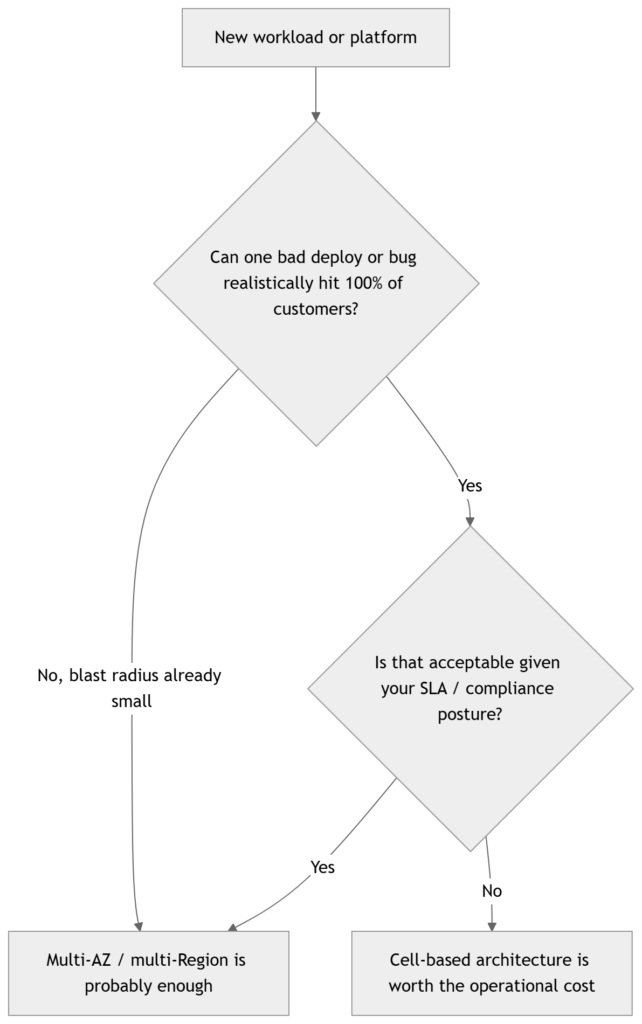
This is also why it sits inside the Reliability pillar of the AWS Well-Architected Framework, specifically as an expanded form of the bulkhead architecture best practice. It’s explicitly called out as guidance for workloads that need extreme levels of resilience, not a default starting point for every workload you own.
Where cell boundaries come from
The first real decision — before compute, before networking — is the partition key. What is the unit of the system that gets isolated? Tenant ID, customer account, geography, and traffic tier are the usual candidates, and the choice cascades into everything downstream: how routing state is modeled, how the data layer gets sharded, and later, how your Terraform and GitOps repos get structured. Pick this wrong and you’ll be re-partitioning a live system later, which is exactly the kind of one-way-door change the whole pattern is meant to avoid.
The second decision is where the isolation boundary actually sits. An AWS Availability Zone can be the cell boundary, as AWS’s own architecture teams have done for containerized workloads. An AWS account can be the boundary, which limits blast radius from compromised credentials or account-level service quotas, at the cost of more accounts to govern and bill. Or the boundary can sit lower, at the Kubernetes namespace or ECS cluster level, inside a shared account. None of these is universally correct — it depends on what failure you’re actually trying to contain.
Sizing cells: the trade-off nobody gets to skip
Smaller cells reduce blast radius, since each one carries fewer customers. They’re also easier to test, easier to reason about, and individually simpler to operate. But more cells means more of everything else — more routing entries, more monitoring dashboards, more deployment pipelines running in parallel — and that operational surface area doesn’t shrink just because each cell is small.
Larger cells go the other way. Fewer moving parts, better economics per customer, less to monitor — and a bigger blast radius when something does go wrong inside one. There’s no formula that spits out the “right” cell size; it’s a genuine trade-off, and the common pattern is to start with a small number of large cells and shrink them over time as your automation and tooling mature enough to absorb the extra operational load. Jumping straight to hundreds of tiny cells before your deployment tooling can handle it just moves the failure mode from “blast radius” to “operational chaos.”
Is this even the right tool for your workload
Here’s the opinion part: most teams don’t need this. If you’re running a single EKS cluster for an internal tool with a handful of customers, cell-based architecture will cost you more in engineering time than any outage it prevents. It earns its place when a single failure hitting all customers simultaneously is genuinely unacceptable — hyperscale SaaS, regulated industries with strict blast-radius requirements, or platforms where a black-swan event (a sudden traffic spike from one tenant, a bad config push, a compromised credential) has to be contained by design, not by hoping your canary process catches it in time.
A planning checklist before you open the AWS console
- Identify the partition key your cells will be organized around.
- Decide the isolation boundary: namespace, cluster, Availability Zone, or AWS account.
- Decide where cell-assignment state lives and who owns the routing layer.
- Decide which resources are centralized (accepting shared blast radius) versus replicated per cell (accepting cost).
- Set an initial target cell size, and the trigger condition for splitting or adding another one.
That last point matters more than it looks. Without an explicit trigger — a tenant count, a request-rate threshold, an AWS service quota you’re approaching — cell sizing decisions get made reactively, usually during an incident, which is the worst possible time to be making them.
The rest of this series works through the pieces that hang off these decisions: which AWS container services and building blocks actually implement a cell on EKS or ECS, how the networking layer routes traffic without becoming a single point of failure itself, how shuffle sharding and deployment discipline make the isolation real rather than theoretical, what this costs against the Well-Architected pillars, and how to provision and deploy dozens of these things without losing your mind. Next up: choosing between EKS and ECS as your cell’s compute substrate.
Share Your Comments & Feedback: