An EC2 instance can be running, passing its own status checks, and billing you same as always. It can also be completely useless to ECS. An EBS volume degrades. A host hits a thermal event. Some network path glitches. The ECS agent quietly stops talking to the control plane, and the instance isn’t dead — it’s a zombie: present in your account, absent from anything that actually matters. Until August 24, ECS had no clean, structured way to tell you that had happened.
What actually shipped
AWS announced that ECS now folds agent connectivity into its structured container instance health checks, and, more importantly, automatically remediates it on two of three compute options.
The signal itself isn’t new. ECS has always exposed an agentConnected flag on container instance state-change events, and AWS has spent years walking customers through wiring up EventBridge, SQS, and Lambda just to catch it. What’s new is that agent connectivity now joins CONTAINER_RUNTIME, ACCELERATED_COMPUTE, and DAEMON as a proper health check type feeding into a container instance’s overallStatus — the same object you already pull with:
aws ecs describe-container-instances \
  --cluster my-cluster \
  --container-instances <container-instance-id> \
  --include CONTAINER_INSTANCE_HEALTH
It watches for the class of failure that’s hardest to catch from inside the instance itself: EBS volume degradation, host thermal events, or network connectivity failures that sever the agent’s line to the control plane without necessarily touching the container runtime or the workload running on top of it. When that persists, the health event carries a check of type AGENT_CONNECTIVITY, a status of IMPAIRED, and a reason string recording when the agent went dark. (Worth checking your agent version before you get excited. The underlying health framework has required 1.57.0 or later for a while, and an old agent just won’t report any of this.)
The part that actually changes your day
Here’s the detail worth sitting with. For Fargate and ECS Managed Instances, an impaired agent-connectivity check now triggers automatic recovery: ECS drains the running tasks, deregisters the instance, and launches replacement capacity on its own. That’s genuinely new. Previously, this failure mode needed the same manual detection loop no matter which compute type you were running. On EC2 launch type, you still get exactly that: an event, and the rest is on you.
The fork looks like this:
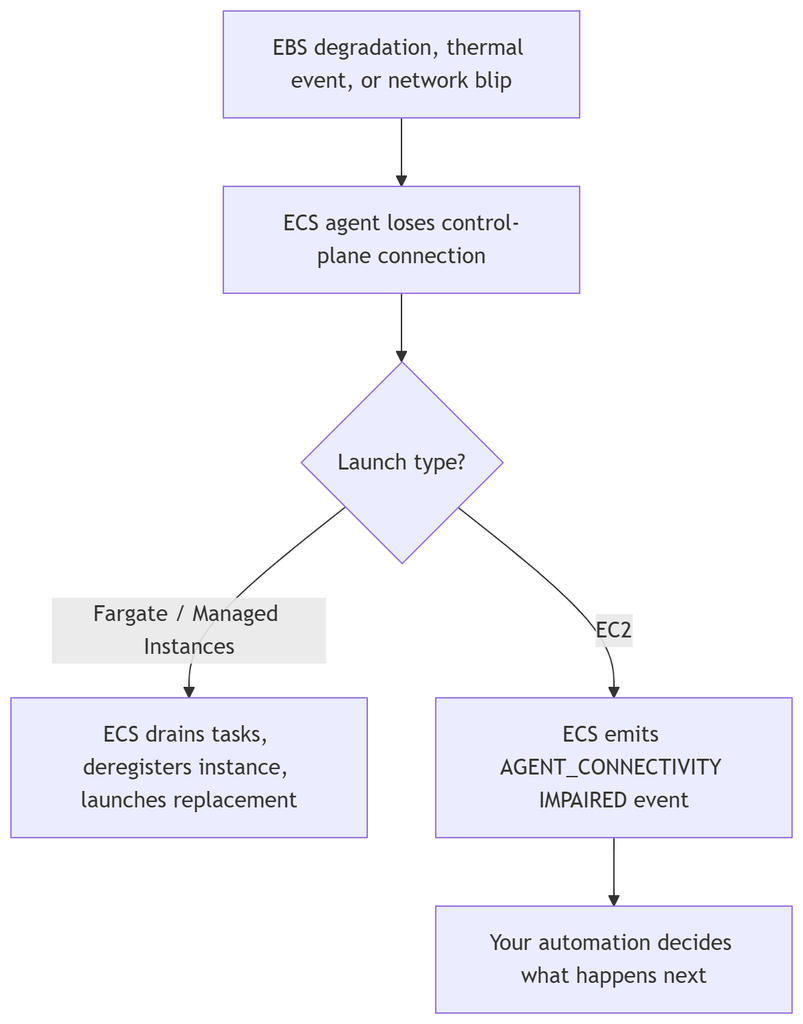
Same trigger, same detection, two different endings depending on who owns the instance underneath.
If you already built the EventBridge-plus-Lambda pipeline for the old agentConnected flag, you can mostly retire that custom disconnect logic and key off AGENT_CONNECTIVITY instead. Same pattern, cleaner signal, one less bespoke piece of infrastructure to maintain.
Where I’ve seen this movie before
This is the same shape as EKS’s node monitoring agent, which has been turning kernel, storage, and network signals into Kubernetes node conditions and handing them to Karpenter for replacement since late 2024. ECS is arriving at the same idea from a different direction — a typed health signal a scheduler can act on, instead of a boolean you have to interpret yourself.
The gap is that EKS gives you this behavior on managed node groups and self-managed Karpenter too, as an add-on you install. ECS on EC2 still leaves you to wire the reaction yourself. I wouldn’t be surprised if that closes eventually — it’s an odd place to stop once you’ve already built the detection half.
What this doesn’t cover
This is infrastructure-layer health, not application health. A task can be serving broken responses just fine while its instance reports overallStatus: OK, because none of this looks inside your container. Keep your ALB target group checks and task-level health checks exactly as paranoid as they already are. This just catches the failures underneath them — the ones where the box itself stopped being trustworthy.
Worth doing this week
It’s free, and it’s already live in every AWS Commercial and GovCloud (US) region. If you’re on Fargate or Managed Instances, there’s nothing to configure — you already have it. If you’re still on EC2 launch type, this is a good afternoon project: point an EventBridge rule at AGENT_CONNECTIVITY IMPAIRED events and fold it into whatever already handles instance replacement, instead of waiting for someone to notice a node gone quiet.
Share Your Comments & Feedback: