• Home
  • Disclaimer
  • Contact
  • Archives
  • About
  • Subscribe
  • Support
  • Advertise

Kernel Talks

Unix, Linux, & Cloud!

  • How-to guides
    • Howto
    • Disk management
    • Configurations
    • Troubleshooting
  • OS
    • HPUX
    • Linux
  • Miscellaneous
    • Software & Tools
    • Cloud Services
    • System services
    • Virtualization
  • Certification Preparations
    • AWS Certified Solutions Architect – Associate
    • AWS Certified Solutions Architect – Professional
    • AWS Certified SysOps Administrator – Associate
    • AWS Certified Cloud Practitioner
    • Certified Kubernetes Administrator
    • Hashicorp Certified Terraform Associate
    • Oracle Cloud Infrastructure Foundations 2020 – Associate
  • Tips & Tricks
  • Linux commands
You are here: Home / Howto

How to find AWS resources that need to be tagged

By Shrikant Lavhate | Published: September 8, 2021 | Modified: September 8, 2021


A quick rundown on how to hunt AWS resources that needs tagging
Scan AWS resources to tag

Tags are the most important and equally negligible AWS entity! As AWS spread grows in an organization they start to realize the importance of tags and then comes the projects for tagging existing resources!

At this stage, the first question on the table is how to search for AWS resources that need tagging? or How can we search non-tagged AWS resources?

It’s a very short process that can be summarised in a single picture!
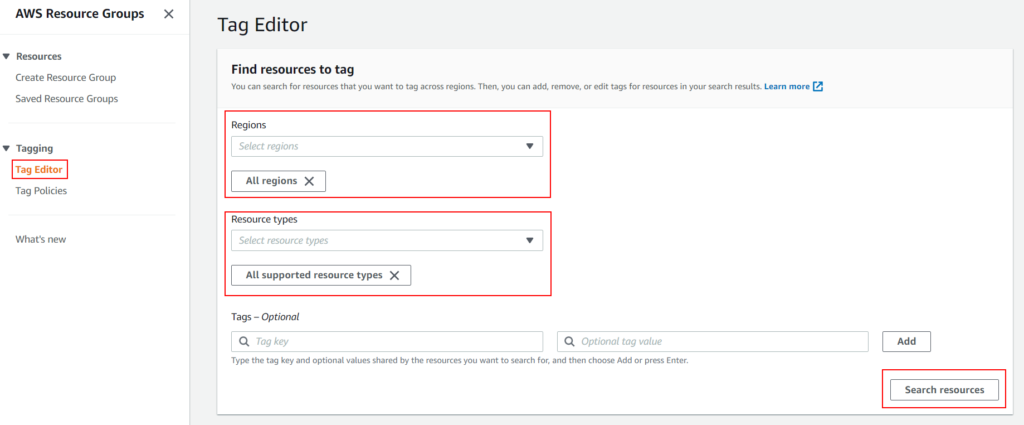
Searching AWS resources to tag

Breaking it down –

  1. Login to AWS Resource groups console.
  2. On left hand side menu, select Tag Editor under Tagging.
  3. Now you should have seelction on right hand side.
  4. Select perticular region or All regions from Regions drop down.
  5. Select specific resource or All supported resource types from Resource types drop down.
  6. Tags – Optional: You can specify key, value details to search for specific tags. Since we are searching for resources that are not tagged lets keep it blank.
  7. Finally, click on Search resources button and you are done!
  8. You should be presented with list of AWS resources in specified regions that needs to be tagged like below.
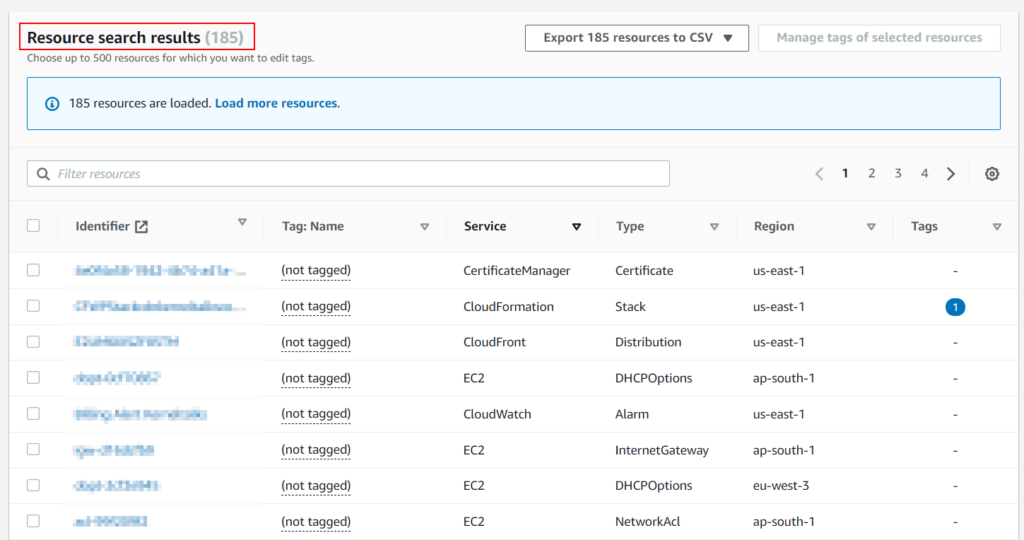
List of AWS resources to tag

You can export the list to CSV as well for further data analytics.

⇠ Previous article
Configuring ALB authentication with Amazon Cognito for ConsoleMe webapp
Next article ⇢
How to configure switching IAM roles in AWS CLI?

Related stuff:

  • 5 ways to check swap on Linux
  • How to upgrade package using YUM in RHEL
  • How to disable IPv6 on Linux
  • How to: Virtual Private Cloud in AWS
  • How to add UUID entry in /etc/fstab in Linux
  • How to connect Windows EC2 AWS server using RDP?
  • How to configure SFTP with restricted directory access
  • How to import VG using different VG name
  • How to add EBS disk on AWS Linux server
  • Highest size files in mount point
  • How to restart inetd service in Linux
  • How to install sar in SUSE Linux

Filed Under: Cloud Services, Howto Tagged With: AWS resources group, AWS tags, Scan untagged AWS resources, Tagging in AWS

If you like my tutorials and if they helped you in any way, then

  • Consider buying me a cup of coffee via paypal!
  • Subscribe to our newsletter here!
  • Like KernelTalks Facebook page.
  • Follow us on Twitter.
  • Add our RSS feed to your feed reader.

Share Your Comments & Feedback: Cancel reply

This site uses Akismet to reduce spam. Learn how your comment data is processed.

Get fresh content from KernelTalks

  • Email
  • Facebook
  • RSS
  • Twitter

Get Linux & Unix stuff right into your mailbox. Subscribe now!

* indicates required

This work is licensed under a CC-BY-NC license · Privacy Policy
© Copyright 2016-2026 KernelTalks · All Rights Reserved.
The content is copyrighted to Shrikant Lavhate & can not be reproduced either online or offline without prior permission.