Somewhere around account number fifteen, most AWS environments hit the same wall. Nobody’s quite sure which of the last few accounts got the CloudTrail baseline. Root MFA is enforced in some accounts and quietly skipped in others. Somebody wrote an SCP (Service Control Policy) blocking public S3 buckets during an incident eight months ago and never got around to rolling it out anywhere except the one OU (Organisation Unit) where the incident happened. None of this shows up in a design review. It shows up as a GuardDuty finding, usually the kind that makes someone ask out loud, in a meeting, “wait, how many AWS accounts do we actually have?”
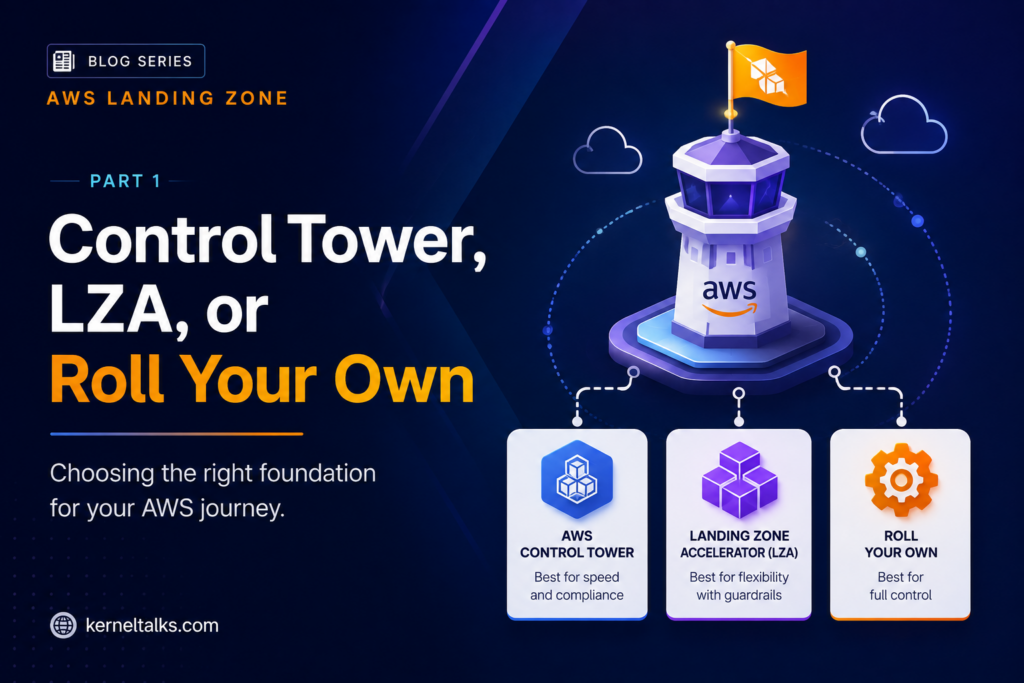
That question is usually the moment a landing zone stops being a nice-to-have and starts being infrastructure. This is the first post in a series on building one properly. I want to use it to settle three things: what a landing zone actually is, the account structure that almost everyone converges on regardless of tooling, and the real decision sitting in front of you once you accept you need one: AWS Control Tower on its own, Control Tower plus the Landing Zone Accelerator, Control Tower plus Account Factory for Terraform, or something fully custom.
What a landing zone actually is
A landing zone isn’t a product, even though AWS sells something with the name attached to it. It’s a pattern: a pre-configured multi-account AWS environment with a consistent security baseline, a defined account structure, and a governance layer that stops new accounts from drifting away from that baseline the moment someone spins one up. AWS’s own framing is close to this: a recommended starting point that includes default accounts, account structure, and network and security layouts, from which you then deploy actual workloads.
Worth being direct about scope here. If you’re running two or three accounts total, none of this is worth the overhead yet. Plain AWS Organizations with a couple of hand-written SCPs covers you fine. The inflection point tends to show up once the account count outgrows what one person can hold in their head, which I’d put somewhere around ten to twenty accounts, earlier still if more than one team can create accounts independently.
It’s also worth clearing up a naming collision. Search “AWS landing zone” today and you’ll still find plenty of material about the original AWS Landing Zone solution, a CloudFormation toolkit from around 2018 built around an account vending machine and StackSets-based baselining. AWS has been steering customers off that solution toward Control Tower for years now. If you’ve inherited one, migrating off it is its own project and outside what I’m covering here. Everything below assumes Control Tower as the starting point, because that’s what AWS actively builds and recommends today.
The account structure nobody really argues about
Whatever tooling sits on top, the account and OU shape converges on roughly the same layout everywhere, because it’s solving a genuinely small number of problems: keeping security tooling separate from workloads, keeping environments that shouldn’t share a blast radius apart, and giving an auditor, and future you, a clean story about what lives where.
Control Tower creates a Security OU automatically, along with two accounts inside it: a Log Archive account, where CloudTrail and Config data lands and stays untouched, and an Audit account, which holds the read-only tooling and access your security team actually uses to look at that data. From there, the recommended shape adds an Infrastructure OU for shared services and networking accounts (Control Tower won’t create this one for you), a Workloads OU for accounts running real applications, usually split into Workloads_Prod and Workloads_Test once you outgrow a single account, and a Sandbox OU where people can break things without touching anything that matters.
That basic shape looks like this laid out as a tree:
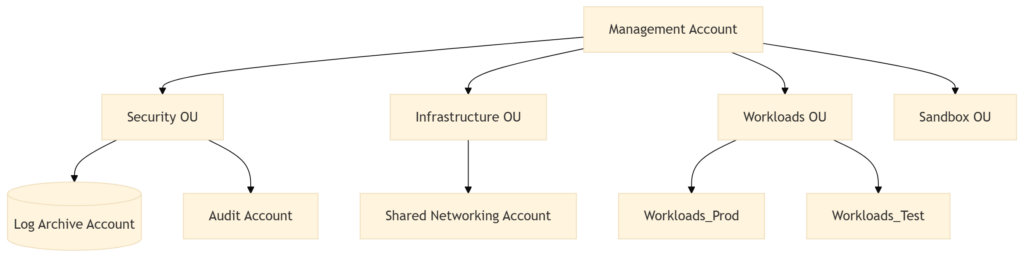
The two OUs that matter most for day-one governance are Security and Infrastructure, since almost every guardrail worth writing gets scoped against one or the other. This part of the design is boring, and it’s also the part most likely to cause real pain if you get it wrong early. Moving an account between OUs later means re-checking every SCP and every piece of automation that assumed the old placement. I’d rather spend an extra day on the OU layout before account number one exists than spend a quarter untangling it after account number sixty.
The actual decision: Control Tower, LZA, AFT, or custom
Once the shape is settled, the real question is how much of the plumbing you build yourself versus let AWS build for you. There are effectively four paths, and I’ve ended up recommending each of them at different times depending on what the organization already had in place.
Plain AWS Control Tower. This is where I’d start almost every new environment. Control Tower is a managed service that orchestrates AWS Organizations, Service Catalog, and IAM Identity Center to stand up a landing zone in under an hour, then keeps working after that: it applies controls (AWS’s current term for what most people still call guardrails, split into preventive, detective, and proactive types), it ships an Account Factory that vends new accounts against a template instead of by hand, and its dashboard flags accounts that have drifted from baseline. If you already have an established multi-account environment you built by hand and don’t want a rip-and-replace, AWS added a Controls Dedicated experience in late 2025 specifically for this case: you get the managed control catalog on top of your existing Organizations setup without adopting the full prescribed account structure first. For most organizations, plain Control Tower, in one of these two modes, covers the job completely.
Control Tower plus the Landing Zone Accelerator (LZA). LZA is AWS’s own CDK-based solution that layers additional orchestration on top of Control Tower rather than replacing it. AWS is explicit that Control Tower should be the foundation and LZA the enhancement, not the other way around. Where LZA earns its complexity is highly regulated environments carrying multiple overlapping compliance frameworks at once, say FedRAMP alongside PCI alongside a customer-specific security addendum, where controls need to land identically across every region from day one rather than getting bolted on region by region as you expand. The honest trade-off: LZA is config-file driven on the surface, but underneath it’s CDK stacks and a genuinely large number of Lambda functions doing the orchestration, and that becomes its own thing to reason about the day a deployment doesn’t behave the way the docs implied it would. I wouldn’t reach for LZA because it sounds more capable. I’d reach for it when a compliance requirement is actively dictating structure that Control Tower’s controls can’t give you on their own.
Control Tower plus Account Factory for Terraform (AFT). If the rest of the org already runs on Terraform, and account provisioning through a separate tool, console clicks for Control Tower or CDK for LZA, feels like an unnecessary second language, AFT is the fit. It follows a GitOps model: you write an account request as a Terraform file, push it, and a pipeline handles provisioning and customization end to end, with a Step Functions trace token so you can actually follow a request through the workflow instead of guessing why an account isn’t ready yet. AWS keeps sanding down the rough edges too. As of a recent update, AFT can automatically re-apply an account’s customizations when that account moves between OUs, which used to be a manual step and a common, quiet source of drift. The catch with AFT generally: it’s a second pipeline sitting on top of Control Tower, with its own state and its own failure modes, so you’re not avoiding operational surface area, you’re relocating it somewhere your team already knows how to debug. Good trade if your Terraform muscle is already strong. Worse trade if you’d be adopting Terraform for the first time just to get AFT.
Fully custom, no Control Tower. I’ve reached for this exactly when an organization had a specific, named requirement that Control Tower’s opinionated model genuinely couldn’t accommodate, and that’s rare. Control Tower is extensible enough that you can work directly in Organizations alongside it and have it reflect changes made outside its own console. Going fully custom means rebuilding drift detection, guardrail enforcement, and account vending from primitives yourself, which is a real, permanent amount of undifferentiated engineering. I’d want a concrete reason before signing up for that, not a general preference for owning the whole stack.
Put as a decision tree, the four paths collapse to three questions worth asking in order:
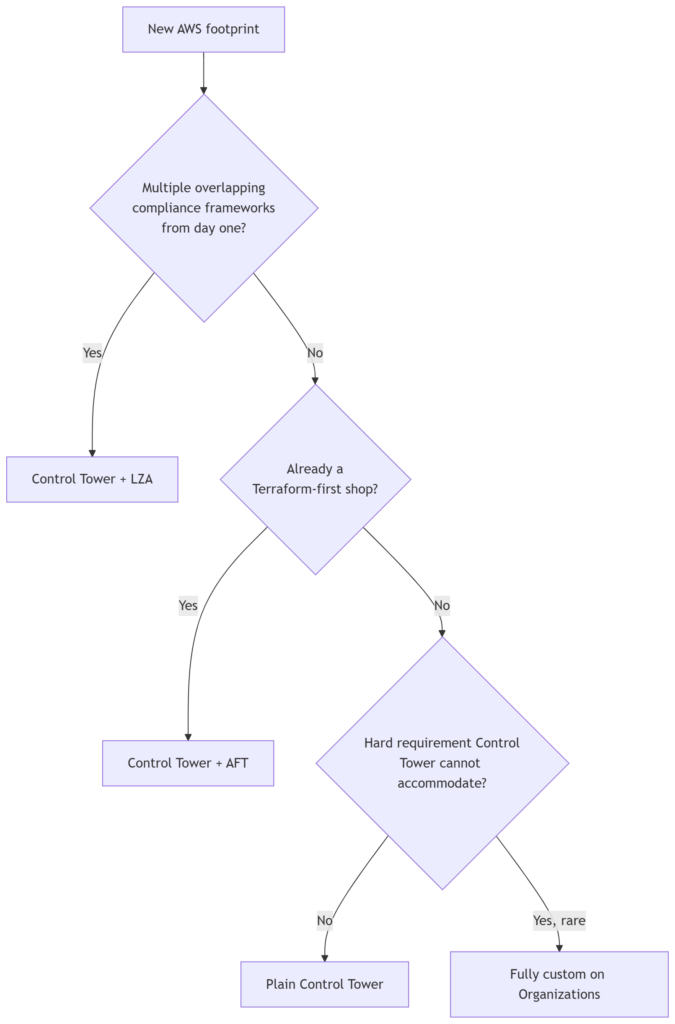
Notice that “fully custom” only shows up after two other doors have already closed. That’s deliberate. It shouldn’t be the default answer to either of the first two questions, and in most environments it never gets reached at all.
What I’d actually do, and what’s next
Asked cold, with no other context: plain Control Tower, the standard OU shape above, and hold off on LZA or AFT until something concrete forces the question, either a compliance framework you can name or an existing Terraform investment you’d rather extend than fork. Landing zones are one of the few places in cloud architecture where the boring default is usually the right call, and the genuinely interesting decisions show up later, in the guardrails you write yourself and the exceptions you inevitably have to carve into them.
That’s where the next post picks up: service control policies and the newer resource control policies doing the actual enforcing, centralized logging that holds up under an audit, and IAM Identity Center as the front door every human uses to touch any of this. Part 3 covers the networking foundation, Transit Gateway against a flatter hub-and-spoke, and where IPAM actually earns its keep. Part 4 gets into running this thing once it’s live: account vending at scale, drift you find before someone else does, and the CI/CD pipeline for the landing zone code itself.
Share Your Comments & Feedback: